Setting Customer Data
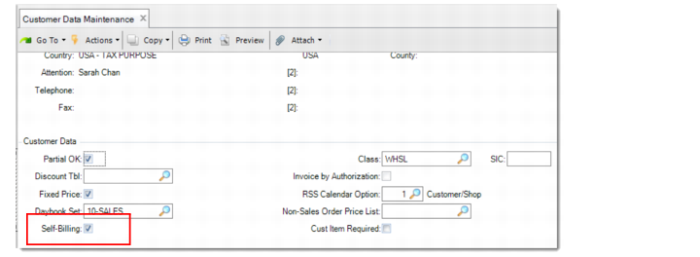
Specify whether the customer is a self-billing customer in Customer Data Maintenance. When a customer is set to a self-billing customer, the discrete sales orders and customer scheduled orders for the customer are eligible for customer self-invoicing.
Customer Data Maintenance – Self-Billing
Self-Billing
Specify whether the customer is a self-billing customer. This field is available only when the Advanced Self-Billing functionality is enabled.
When this field is selected, the Self-Billing field in Sales Order Maintenance or Customer Scheduled Order Maintenance is available and selected, by default. If needed, you can deselect it.
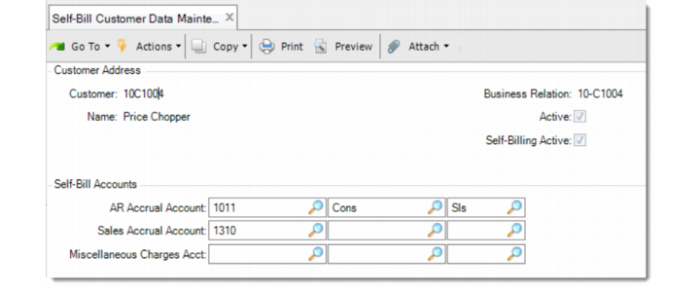
For a self-billing customer, you can further set customer-specific data in Self-Bill Customer Data Maintenance.
Self-Bill Customer Data Maintenance – Self-Bill Accounts
AR Accrual Account
Specify a GL account, sub-account, and cost center used as the balance account for posting the self-billing accrual and reversal. This information is retrieved into the sales order header (discrete sales order or customer schedule order) and order lines.
Sales Accrual Account
Specify a GL account, sub-account, and cost center for the specified self-billing customer. The account must be a valid, active account of type Standard. The accrual is created when shipments are confirmed and reversed when self-billing invoices are posted.
Miscellaneous Charges Acct
Specify a GL account, sub-account, and cost center used for non-sales self-billing invoice lines, such as a self-billing invoice for container/line charges or other miscellaneous postings. It is used for GL-type invoice lines only.
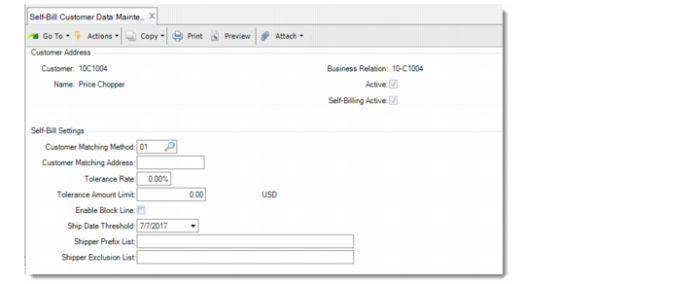
Self-Bill Customer Data Maintenance – Self-Bill Settings
Customer Matching Method
The matching method can be different from customer to customer. This field defaults from Advanced Self-Billing Control. You can change it for specific customers as needed. For details on matching methods, see
Enabling Advanced Self-Billing.
Customer Matching Address
For the customers who use sold-to address, bill-to address, or other address instead of the ship-to address, specify an address in this field to be used for matching shippers with self-billing invoices for the customer.
Tolerance Rate
Specify an allowed percentage for the discrepancy between the shipper lines and the self-billing invoice lines. If a tolerance amount limit is also defined, a perfect match must meet both the tolerance rate and the amount limit.
Tolerance Amount Limit
Specify an allowed amount for the discrepancy between the shipper lines and the self-billing invoice lines. If a tolerance rate is also defined, a perfect match must meet both of the tolerance rate and the amount limit.
Enable Block Line
Specify whether to avoid posting the invoice lines that have no shipment found. If it is selected, the blocked invoices cannot be posted until they are unblocked.
The customer may send self-bill invoices for shippers before you migrate them to the self-bill process or for the shippers that you have already invoiced. To skip these shippers, you can use the shipper exclusion functionality. For more details, see
Self-Billing Exclusion.
Ship Data Threshold
Specify the threshold date. The shipments before the specified date are excluded from invoice posting and matching.
Shipper Prefix List
Enter the prefix of the shippers that you want to exclude from invoice posting and matching. To enter multiple prefixes, separate them with commas.
Shipper Exclusion List
Enter the shipper number that you want to exclude from invoice posting and matching. To enter multiple shippers, separate them with commas. You can also use Self-Bill Excluded Shipments Maintenance to add specific shippers to the exclusive list. For more details, see
Self-Billing Exclusion.