Container Overview
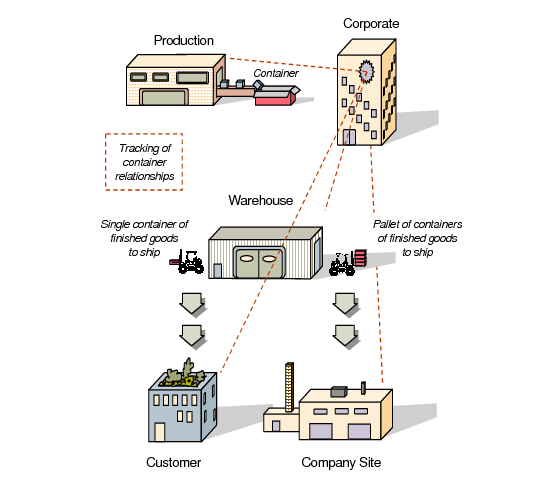
Business Case for Containers shows an example of how containers can be used effectively. Many businesses with fast-paced, high-volume shipping docks place finished goods into containers and warehouse the containers on-site. The containers and their contents are uniquely identified by a number assigned by the company.
Business Case for Containers
For many automotive suppliers, an additional requirement is the ability to define the containers comprising a shipment. This is typically done at the end of the production sequence by attaching products to the containers. The containers are visible within the picking process and attached to the shipper document to satisfy requirements.
At the end of a production line, you can put finished goods in containers to store them before shipping. Once your finished goods are in containers, you can ship them to customers by container or by a larger unit, such as a pallet of containers or truckload. Container-to-finished-goods relationships can be tracked throughout the shipping process.
Container Relationships
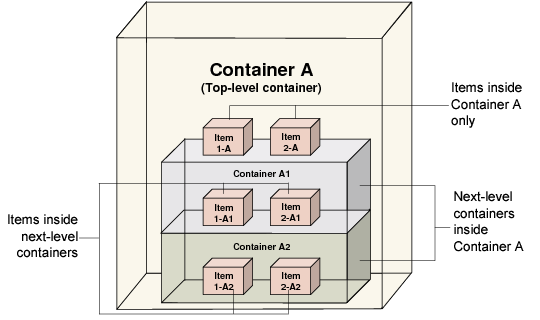
Relationship Between Containers and Items shows the relationship between containers and items. A container can include products and other containers. Each container within a set of containers is uniquely identified by a site code and a container number. You can track and monitor containers throughout the supply chain regardless of how they are manipulated, separated, or repackaged.
Relationship Between Containers and Items
Establishing and Modifying Hierarchies
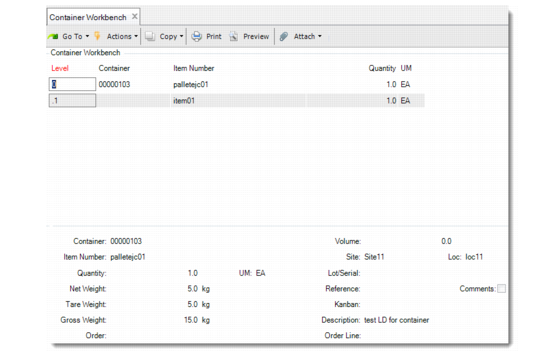
Containers and items have a hierarchical structure. When you create containers in Container Workbench (7.7.1), you can create single-level containers that hold products; when you use Pre-Shipper/Shipper Workbench (7.9.2), you can assign multiple container levels, with each container holding either products or other containers (
Container Detail in Container Workbench and Pre-Shipper/ Shipper Workbench).
Container Detail in Container Workbench and Pre-Shipper/ Shipper Workbench
You can establish container hierarchies and add containers and items to other containers by either building up or by building down.
Building down containers is a process of adding containers and items to existing container structures. In the Pre-Shipper/Shipper Workbench Detail frame, you can build down into containers, adding items and other containers to larger containers.
Building up containers is a process of creating a superset of containers. You can build up containers in the Container Workbench Add Container field on the Summary frame. For example, you can create or add master containers, such as a pallet container and an overseas shipping container. You have only one opportunity to create master containers for a shipment. Ensure that you start at the lowest level container with its item contents and use the Add Container field to create a hierarchy by building up master containers. The Summary frame appears after the Item Information frame.
Within the first entry session of the first container, every time you set Add Container to Yes, you add master containers up the hierarchy. As soon as you enter No and return to the Detail frame, you can no longer increase the hierarchical structure for this shipment. You can add at various levels within the hierarchy as displayed on the Detail screen.
Planning for Containers
Picklists and customer schedule requirements can form the basis for the input source for container and shipper information.
Containerization Menu (7.7) lists the options on the Containerization Menu.
Containerization Menu (7.7)
Number | Menu Label | Program |
7.7.1 | Container Workbench | rcctwb.p |
7.7.2 | Container Inquiry | rciq03d.p |
7.7.3 | Container by Item Inquiry | rcctiq.p |
7.7.5 | SO Container Maintenance | rcctmt.p |
7.7.7 | Shipping Label Print | rcrp10.p |
7.7.23 | Container Delete/Archive | rcctdel.p |