Setting Up Retrobilling
To create retrobills, perform these retrobill-specific setup tasks (in addition to creating, shipping, and invoicing customer schedules):
• Define control settings.
• If required, exclude specific invoices from retrobill processing.
Defining Control Settings
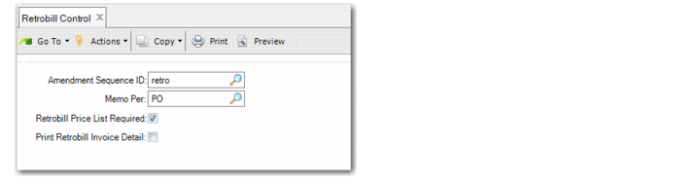
Use Retrobill Control (7.13.13.24) to set processing defaults and related values.
Retrobill Control (7.13.13.24)
Amendment Sequence ID
Specify the NRM sequence, defined in Number Range Maintenance, that is used to automatically generate retrobill amendment numbers when:
• You manually create a retrobill in Retrobill Maintenance and leave the Amendment field blank.
• Retrobill Auto Create automatically generates retrobills.
The system validates that:
• The specified sequence is associated with dataset rbm_auth.
• The sequence definition does not exceed 16 characters.
• The Expiration Date has not been reached, if one is defined for the specified sequence ID.
See
QAD System Administration User Guide for information on defining number range sequences.
Retrobill Price List Required
Specify the level of control that the system applies when selecting a price list in Retrobill Auto Create:
Yes: The price list specified in Retrobill Auto Create must match the specific item and UM of the invoice history record. Otherwise, the system displays an error message.
No: The system can use the price list even if the item and UM are blank.
Note: Regardless of this setting, the currency must match for the price list to be selected.
Print Retrobill Invoice Detail
Indicate whether the system includes detailed retrobill information in the output of the following programs:
• Preview Invoice Print
• Invoice Post and Print
• Invoice Print or Reprint
When this field is No, printed invoices for retrobills include a limited amount of information.
When it is Yes, invoices also provide such details as the ID and amount of the previous amendment, the customer reference number, the original invoice number, and so on.
Memo Per
Specify how the system typically creates invoice lines for retrobill amendments when Create Memos is Yes in Retrobill Auto Create or Retrobill Report.
Note: If Maintain Operation Type in Tax Usage is Yes in Legal Document Control (7.10.24), Create Memos does not display in those programs. Instead, the system displays Create Complementary SO and Create Credit SO.
PO: A single consolidated line is created. A separate invoice line is not created for each item retrobilled. The line item is RETROBILL; the quantity is 1.0 and the item price is the total amount retrobilled for all lines selected.
Item: A separate line item is created on the retrobill invoice for each line item entered. The line item quantity is the original quantity invoiced and the item price is the Retrobill Amount.
Inv: A separate line item is created for each invoice selected.
This field sets the default for the Memo Per field in Retrobill Auto Create and Retrobill Maintenance. You can change the value in those programs.
Note: All invoice lines created are of the type Memo. These lines represent price adjustments rather than additional shipments of inventory.
Excluding Invoices from Retrobilling
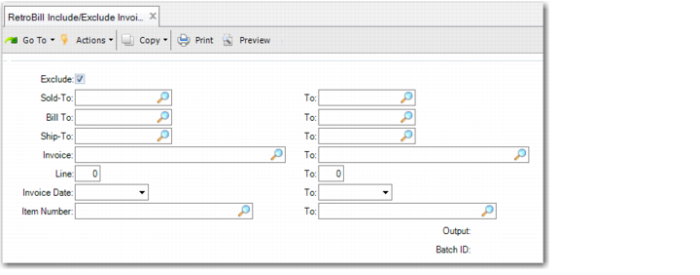
Use Retrobill Include/Exclude Invoice (7.13.13.23) to prevent Retrobill Auto Create and Retrobill Report from processing specific invoices.
By default, invoices can be selected for retrobilling unless you specifically exclude them with this program.
To include a previously excluded invoice, specify selection criteria to select it, then run the program with Exclude set to No.
Retrobill Include/Exclude Invoice (7.13.13.23)