QAD 2017 Enterprise Edition
>
User Guides
>
Scheduled Order Management
>
Customer Schedules
>
Adjusting Prices with Retrobills
Adjusting Prices with Retrobills
Retrobilling (or retroactive billing) is the term used for a price-changing practice used in many industries, but particularly common among automotive suppliers. This practice involves reaching new pricing agreements that affect customer scheduled orders after shipment and invoice processing.
For example, retrobills are useful when:
• Commodity prices fluctuate because of price volatility for raw materials.
• Engineering changes require the customer and supplier to renegotiate part prices.
• Customers expect manufacturer productivity gains to result in downward price adjustments as quantities produced increase.
• Customers must have the parts before price negotiations are completed.
The price change and effective date are agreed upon between you and your customer. When the effective date is in the past, an invoice detailing all shipments since the effective date through the end date must be created for the incremental price difference.
Enterprise Edition provides two ways to create and process retrobills:
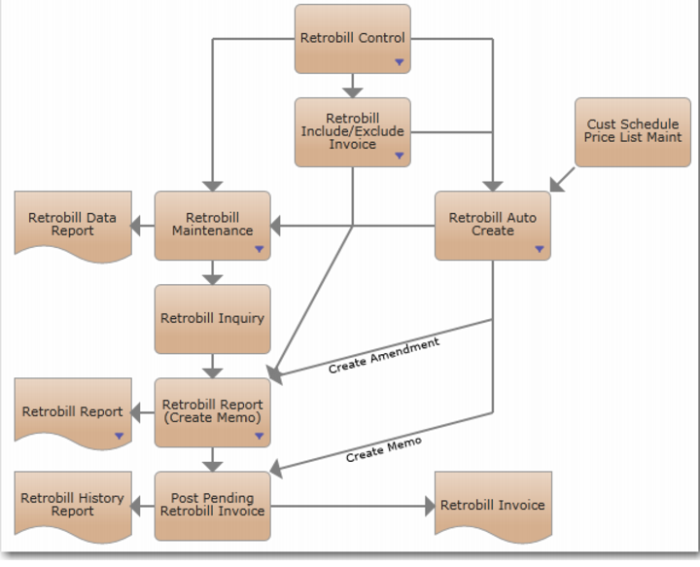
• Manually, using Retrobill Maintenance (7.13.13.1). This method requires you to enter a new price or adjustment amount for each line of each scheduled order that requires retrobilling. You then use Retrobill Report (7.13.13.3) to process the retrobills and create pending invoices. See
Creating Retrobills Manually.
• Automatically, using Retrobill Auto Create (7.13.13.5). This method lets you enter ranges of criteria to select multiple orders and lines. Based on a specified scheduled order price list, the system automatically creates retrobill records and pending invoices for the adjusted amounts. Retrobill Report is required only if you choose to create the invoices later. See
Creating Retrobills Automatically.
In either case, you then run Invoice Post and Print (7.13.4), and communicate the retrobill invoices to your customer.
Retrobilling Process Map summarizes the work flows for both methods.
Retrobilling Process Map