QAD 2017 Enterprise Edition
>
User Guides
>
Scheduled Order Management
>
Supplier Milk Run
>
Milk Run Pickup Sheet Work Flow
Milk Run Pickup Sheet Work Flow
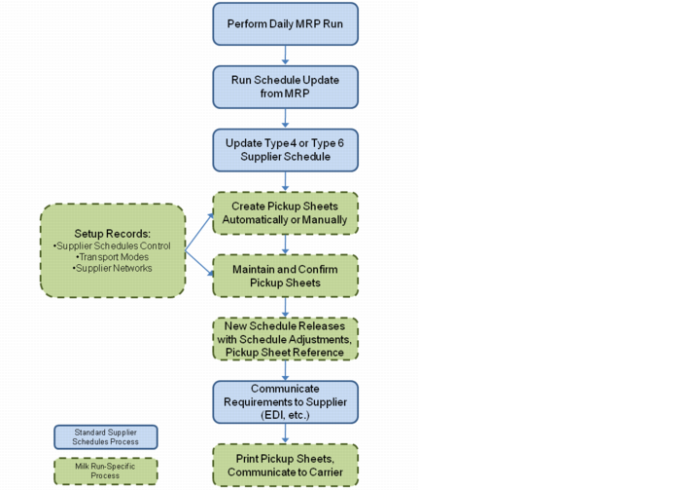
Creating Milk Run Pickup Sheets shows how pickup sheets fit into the overall supplier order work flow.
Creating Milk Run Pickup Sheets
Key steps in using milk runs to support supplier schedule deliveries include:
1 Set up base data used by milk run processing:
a Specify milk run-specific values in Supplier Schedule Control.
b Define vehicles using Supplier Transport Mode Maintenance.
c Create cross-references between your suppliers and the transport modes using Supplier Network Maintenance.
2 Set up and process supplier schedules as normal, including running Schedule Update from MRP.
3 Run Pickup Sheet Auto Create or Pickup Sheet Maintenance to generate pickup sheets that let you communicate the list of suppliers, items, quantities, and pickup sequence to your delivery personnel.
4 During pickup sheet creation, optionally specify a QAD-provided or custom-designed optimization rule.
5 Use Pickup Sheet Maintenance to optimize the sheets by making manual adjustments; confirm the sheets so they are ready for use.
6 The system creates a new schedule release to account for the adjustments and add a reference to the pickup sheet ID.
7 Communicate the new release to your suppliers using your standard methods, such as EDI eCommerce.
8 Communicate the pickup sheets to your delivery personnel.