QAD 2017 Enterprise Edition
>
User Guides
>
Security Administration
>
Users and Roles
>
Overview
>
Role and User Definition Process Workflow
Role and User Definition Process Workflow
Before implementing your security model, you should develop a detailed security plan that describes how users and roles will be defined within your system to satisfy the business requirements of your organization. For details, see
Implementation Summary.
Use the programs in the System Security Menu to set up and configure users and roles in your system.
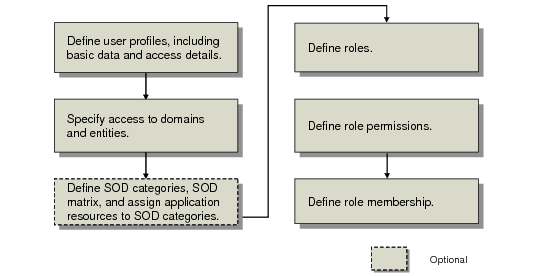
Users and Roles Setup Flow shows the user and role setup process workflow.
Users and Roles Setup Flow
Note: The overall flow used to set up users and roles is consistent between the QAD .NET UI and the Channel Islands UI. The following workflow contains information specific to the QAD .NET UI. For Channel Islands UI specific information, see
User and Role Workflow in Channel Islands.
1 Create system users in User Maintenance (36.3.1), either manually, or automatically using LDAP for user synchronization. This step identifies each user to the system by providing them with a unique ID. You also provide basic user information to ensure that system data for each user is correctly displayed and processed, as well as specify security-related access settings and licensed applications. For details, see
Set Up Users.
3 If you plan to implement segregation of duties, it is best to implement this internal control prior to defining roles and role permissions. Once associations between application resources and segregation of duties categories have been defined, role permission definitions are constrained by your segregation of duties policy. Implementing segregation of duties is optional. See
Segregation of Duties.
4 Create roles in Role Create (36.3.6.1). All system users must be assigned to a role before they can access the system. For details, see
Set Up Roles.
5 After creating user roles, define role permissions using Role Permissions Maintain (36.3.6.5). Role permissions determine which menu-level programs and activities a user can execute; they also determine a small number of non-menu level permissions. For details, see
Define Role Permissions.
6 Then use Role Membership Maintain (36.3.6.6) to assign users to roles and specify the role context—that is, how the role operates within domains and entities. For details, see
Define Role Membership.