Role Permissions Actions
The following actions are available from the Actions menu on the Role Permissions browse, not the hybrid view. If you only see Clear Permissions in the Actions menu, close the hybrid view so you only see the list of system roles.
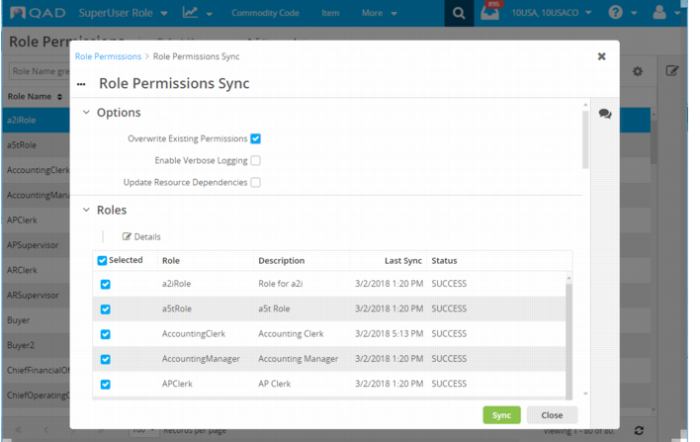
Role Permissions Sync
Role Permissions Sync synchronizes the settings in the Channel Islands UI based on the settings defined in Enterprise Edition. The action updates permissions that have been configured on the Secured Resources tab of Role Permissions Maintain (36.3.6.5) in the QAD .NET UI. Run this action if you set up or change role permissions using Role Permissions Maintain.
1 Select Role Permissions Sync from the Actions menu.
2 Select Overwrite Existing Permissions.
Role Permissions Sync
3 If you are updating all roles, leave them all selected. If you are updating specific roles, clear the Selected check box and then select only those roles that should be updated.
4 Select Sync. The synchronization can take a few minutes to complete.
Update Site Security Using Role Permissions Sync
You must run Role Permissions Sync after you add users to Channel Islands and configure their roles, domains, entities, and sites in User Access. This synchronization updates site security and only needs to include the webui_user role.
1 Select Role Permissions Sync.
2 Select Overwrite Existing Permissions.
3 In Roles, clear the Selected check box.
4 Scroll to webui_user and select the role.
5 Select Sync. The synchronization can take a few minutes to complete.
Refresh Permissions
Use the Refresh Permissions action if you make updates to role permissions through Role Permissions Maintain in the QAD .NET UI and want the permissions to be updated immediately in the Channel Islands UI. If you do not refresh the permissions using this action, users will not see updated permissions until the cache automatically updates, which could be 24 hours depending on the settings.