Defining Label Formats
Using Serialization label functions, you can perform the tasks described in:
You define label formats using Label Format Maintenance (36.13.16.1.9). In Label Format Maintenance, you define a code that links to a label template; you define the label template using Label Template Maintenance (36.13.16.1.7). The system links the label template to a template file that a third-party tool, such as Loftware, generates.
Third-party tools help label designers create the label layout and generate a label template file, and as stated, the system links the template file to the label format. During printing, the system looks at the label format and determines which template file to use. The system fills in data based on the template file, then sends the file to the third-party tool. The third-party tool generates the proper label before sending the label to the printer.
Defining Label Formats per Pack
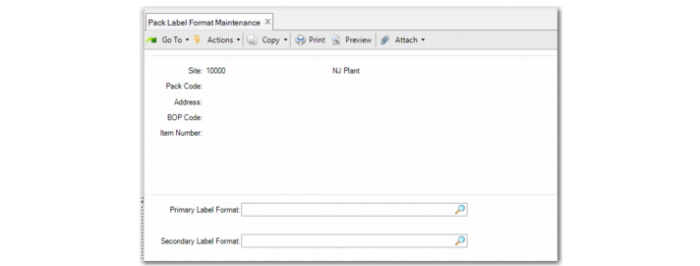
Use Pack Label Format Maintenance (13.14.13) to define a label format code for a specific packaging type. You define here which label format code to use by site, pack code, address, BOP code, and/or item number.
You can define primary and secondary label format codes by site, pack code, address, BOP code, and/or item, and combinations of these. When you enter a new combination, the system creates a new record. When you enter a pack code, the system defaults the primary label format from the pack code data.
For both primary label format and secondary label format, the system follows the priority to find a non-blank value.
You can leave all fields blank to define common label formats for the whole domain. When you do, the system looks for matching label formats when you optionally print a label that generates in the transaction. Use Pack Label Format Report to view pack label format data.
Note: You can print without transactions; for example, by using Label Print by Serial ID. When you do, the system first displays the default format by using the order listed below, and you can optionally select another format to print.
When you print the label, the system determines the format according to the following order:
1 Site, pack code, address, BOP code, item
2 Site, pack code, address, BOP code
3 Site, pack code, address, item
4 Site, pack code, address
5 Site, pack code
6 Site
7 Domain (all fields are blank)
Use Pack Label Format Report to view pack label format data.
Pack Label Format Maintenance (13.14.13)
Site
Enter the site at which the system uses the label formats.
Pack Code
Enter the pack code for which the system uses the label formats.
Address
Enter a valid address or site as the partner associated with the label formats.
BOP Code
Enter the BOP code in which the pack code is included.
Item
Enter the item number that the pack contains.
Primary Label Format
Enter the primary format for the label. For transactions that can print labels for packs, the system looks for this label format for the pack, based on site, pack code, address, BOP code, item combination.
Secondary Label Format
Enter a format to use when printing labels. The system looks for both primary and secondary label formats in these functions—based on site, pack code, address, BOP code, item combination—and prompts you to choose one.
Defining Item Label Formats
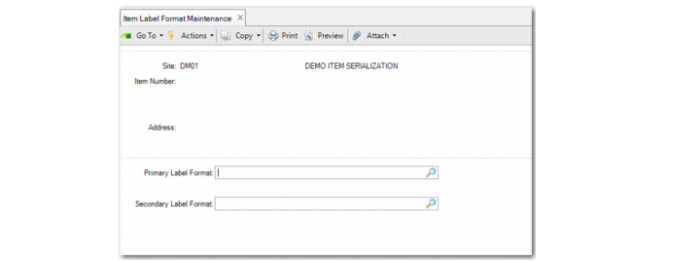
Use Item Label Format Maintenance (13.14.16) to define label format codes for specific inventory items. You can define primary and secondary label format codes for a specific inventory item by site, item, or address.
You can leave all fields blank to define common label formats for the entire domain. When you do, the system looks for a matching label format when you optionally print a label that generates in the transaction. The system matches label formats in the following order:
Site + Item + Addr > Site + Item > Site > Domain (All fields are blank).
For both primary label format and secondary label format, the system follows the priority to find a non-blank value.
Item Label Format Maintenance (13.14.16)
Site
Enter the site in which the system uses the label formats.
Item Number
Enter the item number to which the label formats apply.
Address
Enter the partner associated with the label formats. It must be an existing address or site.
Primary Label Format
For transactions that print labels, the system attempts to find this label format for the pack based on site, pack code, address, BOP code, and/or item.
Secondary Label Format
The system uses this format when printing labels. The system attempts to find both primary and secondary label formats in these functions based on site, pack code, address, BOP code, and/or item, then prompts you to choose one.