Receiving Goods
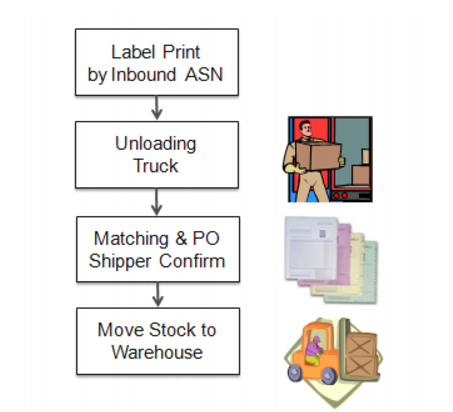
You can receive goods to be serialized from either POs (or supplier scheduled orders), PO shippers, or DOs. Typically an inbound ASN is received. The general flow, using Serialization, is as follows:
Receive Goods Flow
When the truck arrives, staff unload the goods. They can scan the packs based on a predefined matching list, which is based on ASN documents from the supplier. The matching list lets them match what is unloaded with the supplier’s list of goods sent. Typically, matching consists of scanning and checking:
• Item and quantity
• Item, lot, and quantity
• Pallet IDs
• Box IDs
• Entire pack information, including the contained inventory
Information accuracy and label accuracy are important. Shop floor and warehouse staff use the labels and information. The following present examples for receiving serialized goods:
• You receive shrink-wrapped pallets. The pallet content—the IDs for case, pallet, items, lot, and the quantities—was sent in advance through the ASN. You are only required to verify that the number of pallets unloaded matches the number of pallets on the ASN and their serial IDs. When verified, you can approve the receipts.
• You receive item, lot, and quantity data from the supplier and only labels with item, lot, and quantity information. You need labels for boxes, too. So you print box labels beforehand, based on predefined packaging structures and ASN data. Or when the goods are unloaded, you print and attach labels to the box based on predefined packaging structures, and then scan the unique ID number, generating a pending receipt. Once all material is unloaded or labeled, you can choose to match the ASN data against the physically received inventory.
Once finished, you can move stock in the warehouse. When ASNs are not received, you can unload, but you cannot match during the receiving process.
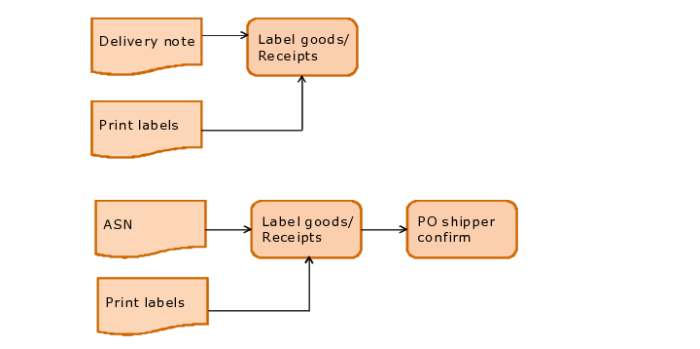
The following graphic depicts the flow for PO (or supplier scheduled orders) and PO shipper receipts.
PO Shipper Receipt Process
Programs to Use for POs/PO Shippers
The following topics describe both QAD EA and Serialization programs that you use when receiving.
1 Create packs and print labels based on PO (or supplier scheduled orders) or PO shipper using Pack Create by PO/Shipper (5.13.12.3).
2 Unload for the order, using:
• Match Level Maintenance (5.13.12.1) to define match level by supplier or ship-to combination when receiving goods
• Pending PO Shipper Unload (5.13.12.13) to capture information of physically received goods by packing slip or by PO shipper ID
• PO Shipper Receipt to receive goods from PO into the inventory
3 Make corrections using PO Corrections in QAD ERP.
You can view all packs and items serial IDs for an inbound shipper, inbound PO receipt, or packing slip so that you can view shipper contents at any time. You can view pack and item data when you confirm a PO shipper or PO packing slip using PO Shipper Receipt or Pending PO Shipper Unload. The system displays the entire hierarchy from the master pack to the item serial ID.
For information on QAD ERP receipt-related programs, refer to
QAD Purchasing User Guide for Enterprise Edition
. Only Serialization receipt-related programs are described in the following topics.
Note: Unplanned receipts, using Pack Receipt Unplanned (3.17.13), although not a step in the PO or PO shipper receipt process, are also described in the following topics, after discussions on receiving goods.
Programs to Use for DOs
You can receive packs and print labels for inventory receipts from DOs and transfer goods by serial IDs from in-transit sites to a user-specified site using site DO Receipt by Pack. See
DO Receipt.