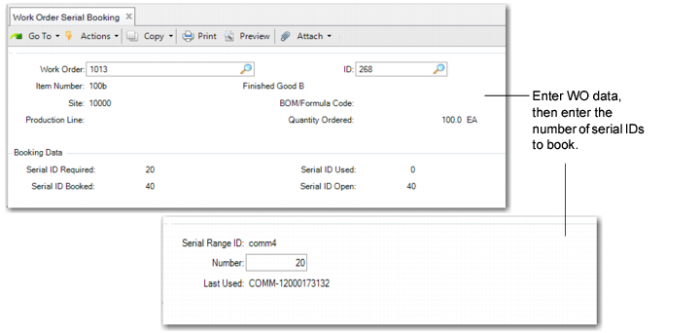
Work Order Serial Booking
Use Work Order Serial Booking (16.15.1) to reserve serial IDs for a discrete work order.
Navigation
The first frame lets you enter a work order. The system then displays item, BOM, production line, and quantity data.
The system also calculates the fields in the Booking Data frame, including the number of serial IDs required for this WO. The number is calculated based on the quantity ordered and the serial hierarchy definition, including components that are determined by BOM explosion logic. The system also displays the number of serial IDs associated with this WO.
When you see a Sales Order frame displayed, you can optionally enter a sales order line. In this way, you associate the current work order with the specified sales order. Serial IDs that are already booked for the specified sales order line can be assigned to and associated with the current work order. All serial bookings for the current work order will come from bookings for the specified sales order line. In the number field, enter the number of serial IDs that you want to assign to the current work order. Make sure that the entered number is no greater than the booked serial IDs that are open for the linked sales order line. When the open quantity of booked serial IDs is not enough, you can use SO/RMA Serial Booking to reserve more serial IDs for the sales order line.
You can click Next to skip the Sales Order frame. Enter or accept the serial range ID and number to reserve serial IDs. The system validates the values. When you enter new numbers, it creates serial IDs with stage set to Booked and association set to the specified work order. When there are multiple serial ranges for the BOP, instead of entering the serial range ID one by one, you can reserve all the required serial IDs at the same time. Click Back when there are no serial IDs booked for the work order, and the system prompts you to book serial IDs for all serial ranges. Click Yes to book serial IDs for all levels.
Determining Default Serial ID
The system determines the default serial ID and number range by:
• Determining the BOP code from item packaging records based on Item (BOM)/Site/Address (Blank)/Transaction Type (RCT-WO).
If an alternate BOM is used, the system still follows the matching logic described in Item Packaging Maintenance, but BOM code gets higher priority than the item.
• Combining the BOP code and BOM code to determine the serial hierarchy definition. Components are determined by WO BOM explosion logic.
If all levels in the serial hierarchy definition use the same serial range ID, then the Serial Range ID field is display only and the default value of the Number field is serial ID required -serial ID booked. Other fields are editable. When calculating serial ID required, the system skips phantom items and serial IDs are calculated for its components.
• Displaying the serial range ID used at the lowest serialized level when the serial range ID is different; the default number is 0.
Work Order Serial Booking (16.15.1)
Work Order
Enter the work order number for which the system books serial IDs. The work order cannot be any of the following:
• Cumulative order
• Flow order
• Final assembly order
• Order with a closed or planned status
• Work order with lot control of the item set to S
ID
Enter the work order ID for which the system books serial IDs.
Sales Order/Line
Enter the sales order and line for this function to consider.
Number
Enter the number of serial ID bookings to create. The system determines the serial ID required by the quantity ordered and the serial hierarchy definition, including components that the system determines by BOM explosion logic. The margin needs to be considered.
Serial Range ID
Enter the sequence ID the system uses in the booking. You cannot enter a blank. When there is only one serial ID range used in the serial hierarchy definition, then this field is display only. When there are several serial ID ranges used in the serial hierarchy definition, then this field defaults from the serial ID range at the lowest serialized level, and you can only enter the serial range ID used in the serial hierarchy definition.