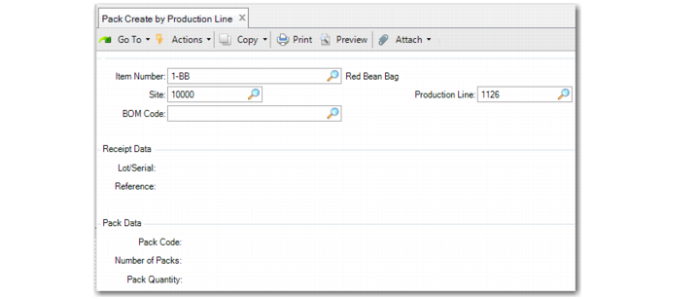
Pack Create by Production Line
Use Pack Create by Production Line (18.22.7.1) to create packs and print labels based on item, site, or production line before production processing.
Navigation
Use the frames to enter production line data, lot/serial, and reference information that is planned to be received on the production line, and pack information.
In the header frame, enter the site, item, BOM code, and production line.
In the Receipt Data frame, you enter lot/serial and reference information that you plan to use on the production line. You can still enter different lot/serial and reference data during the receipt.
In the Pack Data frame, you enter pack data, including the pack code, number of packs, and pack quantity, and the UM for the pack quantity.
Pack Create by Production Line (18.22.7.1)
Item Number
Enter the item number for which the system creates serial IDs.
Site
Enter the site on which the item is produced.
BOM Code
Enter the product structure for the production.
Production Line
Enter the production line to run.
Pack Code
Enter the pack code for which the system assigns serial IDs. The default is from the lowest-level serialized pack of the BOP structure that is determined by item (BOM), site, address (blank), and transaction type (RCT-WO).
You can modify the pack code. An assembly pack code is allowed. Blank is allowed when serial control of the item is set to M in Item Master Maintenance. When Pack Code is blank, the system considers it as item serialization. In this situation, the system ignores the pack quantity and UM.
In most cases, the pack code is the unit pack. However, if serial control of the unit pack is set to Never in Packaging Structure Maintenance, the system looks for the upper level whose serial control is other than Never.
Note: When determining the BOP code from item packaging records, BOM has a higher priority than the item. This means that when alternate BOMs are in use, the system still follows the matching logic described in Item Packaging Maintenance; however, BOM codes have a higher priority than item.
Number of Packs
Enter the number of packs you want the system to create. You cannot enter a negative number.
Pack Quantity
Enter the expected quantity that the pack holds. The default is from the quantity per of the lowest-level serialized pack of the BOP structure. You cannot enter a negative number.
When serial control of the unit pack is set to Never, the system multiplies the quantity per of each level whose serial control is set to Never; however, you can modify it.
Pack Quantity UM
Enter the UM of the content the pack holds. The default is from the item UM. When you specify an assembly pack code, the value you enter here must be a pack UM.
Lot/Serial
Enter the lot/serial number to use on the production line.
Reference
Enter the reference to use on the production line.