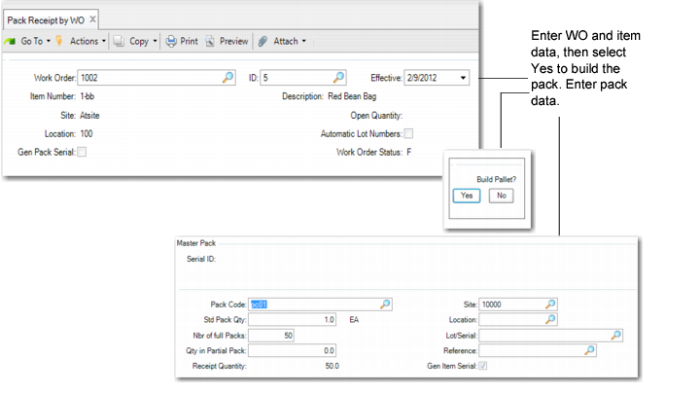
Pack Receipt by WO
Use Pack Receipt by WO (16.15.3) to:
• Receive goods by pack or receive loose serialized items using Serialization logic.
• Build the pack by scanning serial IDs.
• Create packs by batch.
You enter Yes in the Gen Pack Serial field to create new packs. When you specify Yes, you must specify a standard pack quantity and receive for a single WO at a time, so that you handle only one WO line transaction at a time.
Create New Unit Packs
You can create new unit packs, and then load inventory to the new unit pack.
Select No when the system prompts you to build the pallet. Then enter a blank serial ID in the Unit Pack frame. Finally, enter inventory data. You can enter additional data and the BOP code. The system generates the serial ID for the unit pack only. When you specify Yes, you are required to specify the standard pack quantity and receive quantity of each WO line.
Create New Unit Packs and Assembly Packs
You can also create new unit packs and new assembly packs, and then build the unit packs on the assembly pack. You can then load the inventory into the unit pack and load the unit packs into the assembly pack.
To perform this task, you select to build a pallet when prompted and enter the parent serial ID in the Master Pack frame and the child serial ID in the Unit Pack frame. You then load inventory and select the packaging structure to use, if necessary. The system receives the inventory and builds the Serialization information.
Note: When the item to be received is set to mandatory serial controlled in the item master, the system prohibits receipt using the QAD EE Unplanned Receipts program.
Build Lower-Level Packs on an Existing Parent Pack
Finally, you can use this program to build lower-level packs on an existing parent pack. To do this task, you select the existing assembly pack, then create a new lower-level pack or use the serial ID that the system already created via pack create functions. You then load inventory into the unit pack and build the lower-level pack on it parent.
Generating Serial IDs According to Pack Code
When you set Gen Pack Serial to Yes, the system generates a number of serial IDs, according to:
• The pack code
• Standard pack quantity
• Number of full packs you enter
Navigation
Enter the work order, ID, effective date, site, and location, then specify Yes in Gen Pack Serial to create new packs.
When pending packs exist for the location you enter, the system prompts you to receive all pending packs for the WO. When you respond with No, the system lets you create new pending packs.
Note: The Build Pallet program controls whether one-level or two-level unit boxes are created. The Gen Pack Serial field in Serialization Pack Receipt by WO controls the way to create pending packs. When you respond with Yes to Gen Pack Serial, the system generates pack serial and item serial IDs automatically by entered receipt data. When you respond with No, you scan or generate pack serial IDs manually.
When you respond with Yes to receive all pending packs, the system receives all pending packs of the WO into inventory and ends the transaction.
After details display and you confirm that details are correct, the system displays the Additional Data frame. Once completed, you can receive the packs.
Pack Receipt by WO (16.15.3)
Work Order
Enter the WO number for the serial IDs that you want to receive.
ID
Enter the work order ID for which serial IDs have been booked or are to be created.
Effective
Enter the effective date for the work order. The default is the system date.
Site
Enter the site for the work order.
Location
Enter the location for the work order.
Open Quantity
The system displays the quantity open for this work order. You cannot edit this field.
Gen Pack Serial
Specify Yes to have the system generate pack serial numbers.
When serial IDs are already booked for this WO, the system assigns pack information to booked serial IDs first. If booked serial IDs are fewer than the specified number of packs and do not link with an SO, the system creates new packs when you specify Yes in this field. Otherwise, the system displays an error.
Serial ID
Enter the serial ID of the parent pack.
Unit Pack Serial ID
Enter the unit pack serial ID.
Lot/Serial
Enter the lot/serial number to use in the WO receipt.
Printed
This field indicates whether the label of the scanned serial ID printed. When the label scanned printed correctly, the inventory data item, site, lot/serial, and reference print, and you cannot change this field. When you decommission a serial ID, the system resets this field to No.
Pack Code
Enter the pack code for which the system assigns to booked serial ID or creates for serial IDs. The default is from the lowest-level serialized pack of the BOP structure that is determined by item (BOM), site, address (blank), and transaction type (RCT-WO).
You can modify the pack code. An assembly pack code is allowed. Blank is allowed when serial control of the item is set to M in Item Master Maintenance. When Pack Code is blank, the system considers it as item serialization. In this situation, the system ignores the pack quantity and UM.
In most cases, the pack code is the unit pack. However, if serial control of the unit pack is set to Never in Packaging Structure Maintenance, the system looks for the upper level whose serial control is other than Never.
Note: When determining BOP code from item packaging records, BOM has a higher priority than the item. In other words, when alternate BOMs are in use, the system still follows the matching logic described in Item Packaging Maintenance; however, BOM codes have a higher priority than items.
Std Pack Quantity
Enter the expected quantity that the pack holds. The default is from the quantity per of the lowest-level serialized pack of the BOP structure. You cannot enter a negative number.
When serial control of the unit pack is set to Never, the system multiplies the quantity per of each level whose serial control is set to Never; however, you can modify it.
Number of Full Packs
Enter the number of packs you want the system to create. You cannot enter a negative number. When the work order is linked with a sales order line, you cannot enter a number that is greater than the number of booked serial IDs.
When booked serial IDs are associated with the WO, the system tries to update booked serial IDs first.
• When the booked serial IDs are not associated with any SO line, and their quantity is less than the specified number of packs, the system creates New serial IDs. The number of created serial IDs equals:
(Number of Packs - Number of Booked Serial IDs)
• When the number of booked serial IDs is greater than the number of packs, the system updates the first N (number of packs) booked serial IDs with the stage set to New and adds pack code, pack quantity, UM, lot/serial, and reference. The system displays a message indicating that serial IDs are updated.
The default is based on the open quantity and quantity per of the lowest-level serialized pack in the BOP structure. When serial control of the unit pack is set to Never, the system multiplies the quantity per of each level whose serial control is set to Never.
Quantity in Partial Pack
Enter the quantity in an incomplete pack. This quantity is the quantity to be put into a partially filled pack. In general, the quantity is less than the standard pack quantity; however, it can be greater than the standard pack quantity. When greater, the system displays a warning.
BOP Code
Enter the BOP code for the pack.