QAD 2017 Enterprise Edition > User Guides > Serialization > Serialization Processing > Inventory > Pack Create by Pack Structure
  
Pack Create by Pack Structure
Use Pack Create by Pack Structure (3.17.1) to create packs and print labels:
Before inventory is received (inbound, work order)
Outbound during packaging
In the warehouse for serialized packaging units
Pack Create by Pack Structure lets you generate packs or labels, or both, for all packaging levels at once as defined in the packaging structure. It also lets you change the pack content defined in the pack structure.
You can also define the labels to be printed for items, lot/serial, or reference quantities. The system automatically selects serial ID numbers, stages the created serial master records as New, and optionally prints labels.
Navigation
There are several frames presented in Pack Create by Pack Structure.
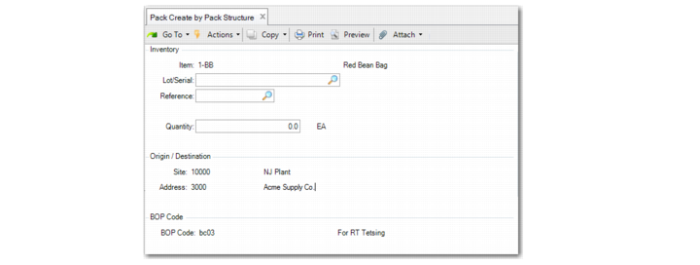
In the Inventory Frame, define for which inventory record the system creates serial ID records or prints BOP code labels. Specify the item, lot/serial, reference, and quantity. The system generates serial IDs based on the information you enter.
Note: As you typically use Pack Create programs to create serial IDs before inventory transactions, the item, lot, or serial IDs may not exist in stock.
In the Origin/Destination frame, specify the origin of the pack structure by specifying the site and address.
Once you enter the BOP Code, the system displays the BOP Code Frame. For information on options, see BOP Code Frame.
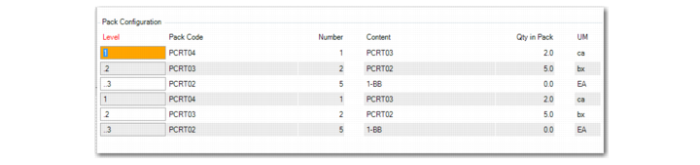
After you enter data in the BOP Code frame, the system displays the Pack Configuration Frame. For information on options, see Pack Configuration Frame.
System Calculations for Pack Configuration
For pack configuration, the system calculates the number of full master packs and incomplete master packs, based on the packaging structure and quantity you enter. The system-calculated incomplete master packs are either 0 (zero) or 1 (one), which means that the system attempted to create a full master pack as much as possible.
Based on a calculated full master pack and an incomplete master pack, the system calculates the total quantity in full master packs and total quantity in incomplete master packs, based on the following:
Quantity in full master pack + quantity in incomplete pack = Quantity entered
Based on the entered incomplete master pack, the system displays the pack configuration frame. As full master packs completely follow the BOP structure, there is no need to configure full master packs.
For each of the incomplete master packs, the system creates a packaging structure in the Pack Configuration frame. The system attempts to create full packs first. When creating the packaging structure, if there is a level where the Serial Control field in Pack Code Maintenance is set to Never, the system does not create this level. The system multiplies Qty Per of the parent level by Qty Per of the current level.
Example: You have a BOP 1 BOP code with a structure of the following two levels:
 
Level
Pack Code
Content
Qty Per
UM
1
Pallet
Case-O
5
CA
.2
Case-O
Item A
250
UM
When you enter a quantity of 4500, the system calculates the result as:
Full Master pack = 3
Qty in Pack =3750 EA
Incomplete Master pack=1
Qty in Pack = 750 EA
Example: You have a BOP 2 BOP code with a structure of the following three levels:
 
Level
Pack Code
Content
Qty Per
UM
1
Pallet
Carton
2
CT
.2
Carton
Pouch
5
PO
..3
Pouch
Item A
100
EA
When you enter a quantity of 4500, the system calculates the result as:
Full Master pack = 4
Qty in Pack =4000 EA
Incomplete Master pack=1
Qty in Pack = 500 EA
You can modify full master packs and incomplete master packs. When you do, the system calculates, using the following:
Qty in Full Master Pack = Full Master Pack * Standard Master Pack Quantity (Determined by BOP)
Qty in Incomplete Master Pack = Quantity entered - Qty in Full Master Pack
When the following is true, the system warns you that the incomplete master packs are overloaded:
Qty in Incomplete Master Pack / Standard Master Pack Quantity > Incomplete Master Pack
Example: The following shows examples of pack structure results when you do and do not make changes:
When you do not change the system-calculated full master pack and incomplete master pack, the pack structure is as follows:
 
Level
Pack Code
Number
Content
Qty Per
UM
1
Pallet
1
Case-O
5
CA
.2
Case-O
3
Item A
250
EA
.2
Case-O
2
Item A
0.0
EA
When you change full master pack to 2 and incomplete master pack to 2, the pack structure is as follows:
 
Level
Pack Code
Number
Content
Qty Per
UM
1
Pallet
1
Case-O
5
CA
.2
Case-O
5
Item A
250
EA
1
Pallet
1
Case-O
5
CA
.2
Case-O
3
Item A
250
EA
.2
Case-O
2
Item A
0.0
EA
When you do not change the system-calculated full master pack and incomplete master pack, the pack structure is as follows:
 
Level
Pack Code
Number
Content
Qty Per
UM
1
Pallet
1
Carton
2
CT
.2
Carton
1
Pouch
5
PO
..3
Pouch
5
Item A
100
EA
.2
Carton
1
Pouch
5
PO
..3
Pouch
5
Item A
0.0
EA
When you change the full master pack to 3 and the incomplete master pack to 2, the pack structure is as follows:
 
Level
Pack Code
Number
Content
Qty Per
UM
1
Pallet
1
Carton
2
CT
.2
Carton
2
Pouch
5
PO
..3
Pouch
5
Item A
100
EA
1
pallet
1
Carton
2
CT
.2
Carton
1
Pouch
5
PO
..3
Pouch
5
Item A
100
EA
.2
Carton
1
Pouch
5
PO
..3
Pouch
5
Item A
0.0
EA

Pack Create by Pack Structure (3.17.1)
Item
Enter a valid item for which the system generates serial IDs. You cannot enter a blank.
Lot/Serial
Enter the lot/serial associated with the item.
Reference
Enter the reference associated with the item.
Quantity
Enter the quantity of the item. The quantity determines the quantity of the generated serial IDs. A negative number is not allowed.
Site
Enter a site for the item. The site you enter here does not imply that the item must stay at this site. The site here indicates the inventory transaction for which the system creates serial IDs. Blank is allowed.
Address
Enter the partner associated with the inventory transactions for which the serial IDs are created. For example, if you create a serial ID for items to be received, the address is the supplier. It must be an existing address or site. Blank is allowed.
BOP code
Enter the bill-of-packaging structure of the items. The value defaults from Item Packaging Maintenance based on the item, site, address combination. You can modify the code here.
BOP Code Frame
Once you enter all header and Origin/Destination Frame data and the BOP code, the system displays the BOP Code frame. In the BOP Code frame, configure the incomplete and master packs by entering the number of full master packs and incomplete master packs. You configure incomplete master packs by entering the Number of Standard Pack Quantities and the Qty in Pack fields in the Pack Configuration frame. When you press Enter, the system:
Generates serial IDs based on the item, site, address, and pack code.
Optionally displays the number of created serial IDs in the Pack Configuration frame.
Sets the stage as New.
Prompts you to print labels when the Label Printing module is installed, and when you specify Yes, displays the printer selection frame. The system prints the labels according to the predefined label format definitions.

BOP Code Frame
Full Master Pack
Enter the number of full master packs.
Incomplete Master Pack
Enter the number of incomplete master packs.
Pack Configuration Frame
You can modify the packaging structure in the Pack Configuration frame. You can modify the Number and Qty in Pack fields.
When you press Insert on the Level field in the Pack Configuration frame, the system:
Creates the packaging structure below this point, starting from the next level to the lowest level. The number of the next level is 1.
Updates the Qty in Pack of the current level.
Skips the levels with Serial Control set to Never.
Displays a pack overload warning when Qty in Pack of the current level is greater than Qty Per in the packaging structure.
Prohibits you from inserting at the lowest level.
Note the following in the displayed pack configuration data:
Only incomplete master packs are included in the display. For example, if you enter 2 in the Incomplete Master Pack field, the system displays two whole packaging structures.
You can enter the quantities for full and incomplete master packs.
For any line of incomplete packs, if the number is 0 or Qty in Pack is 0, the system does not create serial IDs for this line.
Depending on the data, the pack structure as the serial ID range can vary.
When you press Delete on the Level field, the system:
Removes the packaging structure, starting from the current level to the lowest level
Updates the Qty in Pack of the parent level
Prohibits you from removing the master pack level
The system prompts you to verify that all information is correct. When you specify Yes, the system stores the records and creates serial history records.

Pack Configuration Frame