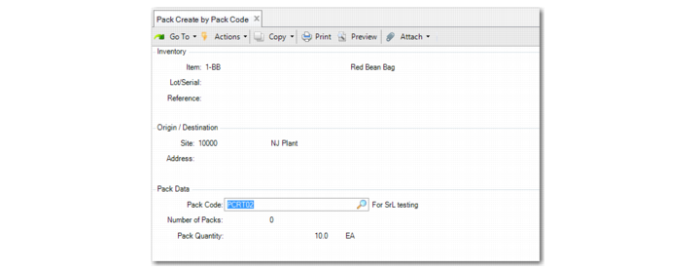
Pack Create by Pack Code
Use Pack Create by Pack Code (3.17.2) to create packs and print labels:
• Before inventory is received (inbound, work order)
• Outbound during packaging
• In the warehouse for serialized packaging units
Pack Create by Pack Code lets you define labels to be printed based on pack code and the number of packs.
You can also define the labels to be printed for items, lot/serial, or reference quantities. The system automatically selects serial ID numbers, stages the created serial master records as New, and optionally prints labels.
Navigation
There are several frames presented in Pack Create by Pack Code.
In the Inventory Frame, define for which inventory record the system creates serial ID records for a particular pack code. Specify the item, lot/serial, reference, and pack code. The system generates serial ID based on the information you enter.
Note: As you typically use Pack Create programs to create serial IDs before inventory transactions, the Item/Lot/Serial may not exist in stock.
In the Origin/Destination frame, specify the origin of the pack structure by specifying the site and address.
In the Pack Data frame, specify pack information. The system supports both unit and assembly packs. Specify the pack code, the number of packs to be created, the expected quantity to be held in the pack, and the UM of the content to be held in the pack. When you press Enter, the system:
• Generates the serial ID based on the item, site, address, and pack code.
• Sets the stage as New.
• Prompts you to print labels when the Label Printing Services module is installed, and when you specify Yes, displays the printer selection frame. The system prints the labels according to the predefined label format definitions.
Pack Create by Pack Code (3.17.2)
Pack Code
Enter a valid pack code for which the system creates serial IDs. The default is from the unit pack of the BOP structure that the system determines by item, site, and address. You can enter an assembly pack code. You cannot enter a blank.
Number of Packs
Specify the number of packs to be created. Negative is not allowed.
Pack Quantity
Enter the expected quantity to be held in the pack. The default is from the quantity per of the unit pack/inventory item level of the BOP structure that the system determines by item, site, and address. A negative is not allowed.
If Serial Control of Unit Pack is set to Never in Pack Code Maintenance, the system attempts to find the higher level when Serial Control is not set to Never. The system multiplies quantity per of its parent level with quantity per of the current level.
Pack Quantity UM
Enter the UM of the content to be held in the pack. Defaults from the item UM. If users specify an assembly pack code, the value entered here must be a pack UM.