QAD 2017 Enterprise Edition > User Guides > Serialization > Serialization Processing > Inventory > Pack Stage Change
  
Pack Stage Change
Use Pack Stage Change (3.17.10) to change the stage of packs between inactive stages. Inactive stages include the Booked, New, Pending, Consumed, Decommed, Unused, and Inv Adjusted stages.
You cannot change the stage code to Consumed, Active, Picked, or Pending in this program. The system records the serial history.
The system can take several types of action when you change stages. Validations, too, occur differently, depending upon the type of change. The following topics present all system actions by number, followed by system validations by number. After that, topics explain each stage change, telling you which system action number and which validation number apply to the change.
You can use the .NET UI Multiple Pack Stage Change program to change serial ID stages in bulk based on various filtering criteria such as master serial ID, site, and location.
System Actions and Validations
Use the numbers associated with the system actions and validations described in this topic with information in Changes from Stage to Stage to determine valid changes and system responses.
The system can take any of the following actions:
1. Clear pack code.
2. Clear item number, lot/serial, and reference.
3. Clear site and location.
4. Change stage code.
5a. Decommission a whole structure and make the same changes to all serial IDs in the structure
5b. decommission a whole structure and make the same changes to all serial IDs in the structure except for the item serial IDs.
6. Clear order information except for the booked SO (or customer scheduled order).
7. Clear Qty in Pack.
8. Clear Standard Pack Quantity and Content UM.
The system can validate as follows:
v1. When not booked to an SO (or customer scheduled order), the system cannot change the stage to Booked.
v2. Item serial IDs are not supported.
v3. When the serial ID is booked to an SO, the system cannot change the stage to New.
v4. When the serial ID is not linked with a shipper, the system cannot change the stage to Inv Adjusted.

Changes from Stage to Stage


Current
Stage
To
Booked
To
New
To
Pending
To
Consumed
To
Decommed
To
Unused
To
Inv
Adjusted
Booked
NA
No
No
No
No
4, 6, 7, 8
No
New
1, 2, 3, 4, 7, 8, v1
NA
No
No
2, 3, 4, 6, 7, 8
1, 2, 3, 4, 6, 7, 8
No
Pending
1, 2, 3, 4,
5a, 7, 8, v1
4, 5a, 6, 7, v3
NA
No
2, 3, 4, 5a, 6, 7, 8
1, 2, 3, 4,
5a, 6, 7, 8
4, 6
Consumed
1, 2, 3, 4,
5b, 7, 8, v1, v2
4, 5b,6, 7, v2, v3
No
NA
2, 3, 4, 5b,
6, 7, 8, v2
1, 2, 3, 4,
5b, 6, 7, 8, v2
4, v2, 6, v4
Decommed
1, 4, 7, 8, v1
4, 6, 7, v3
No
No
NA
1, 4, 6, 7, 8
No
Unused
4, 7, 8, v1
No
No
No
No
NA
No
Inv
Adjusted
1, 2, 3, 4,
5a, 7, 8, v1
4, 5a, 6, 7, v3
No
No
2, 3, 4, 5a, 6, 7, 8
1, 2, 3, 4,
5a, 6, 7, 8
NA
Navigation
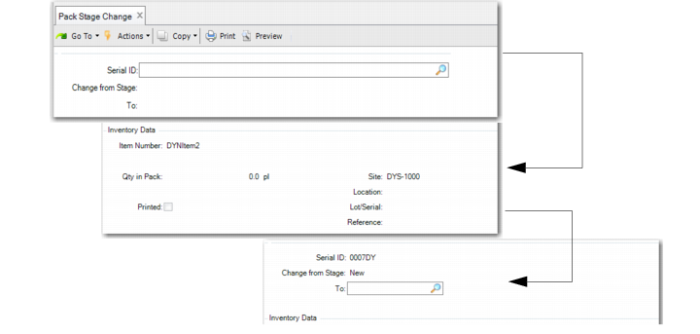
Enter the serial ID to be changed in the first frame. The pack or item serial entered here must be inactive. The system displays inventory information in the Inventory Data frame. The system also displays linked order information in the Order Information frame.
The system displays the current stage in the Change From Stage field. You specify the new stage in the To field.

Pack Stage Change (3.17.10)
Serial ID
Enter the serial ID whose stage you want to change. The system displays inventory data related to the serial ID and defaults the Change from Stage field to the current stage.
To
Enter the stage to which you want to change the serial ID.