Cycle Counting
The system considers serialized IDs in cycle counting.
When you begin cycle counting, you count all packs at a location at the same time and in the same batch. You can decide when counts are at the master pack level, or when each lower-level pack is also counted. The system assumes that when a lower-level pack is counted, all lower-level packs are also counted for the counted master pack. When you count only some lower-level packs, the system assumes that the non-counted lower-level packs are missing and adjusts those packs in inventory. When you count only the master pack and no lower-level packs, the system assumes that all inventory associated with the master pack is accounted for. When you count only a lower-level pack at a location, but the pack was expected to be on a master pack in a different location, the system removes the pack from the master pack and adds it to the inventory at the counted location.
You can use the following existing programs to perform counts for serialized inventory:
• Cycle Count Worksheet Print (3.13.1)
This program lets you create a worksheet to record the results of cycle count. If you set the Print Serial ID filter to Yes, the system prints serial hierarchies on the worksheet. Serial IDs are displayed on the worksheet by item and lot combination.
You enter the time for cycle count batch processing in the Cycle Count Batch Active (D H: M) field in Serialization Control. Once you initiate a cycle count for a location, the system initiates a new batch at the same time. The batch expires after this amount of time has elapsed.
Cycle Count and Recount Entry by Location
Use Cycle Count Entry by Location (3.13.13) to count the number of items by site and location. This program counts inventory by serial ID, but does not count or validate package structures.
Note: You can use Cycle Recount Entry (3.13.14) in the same way, except that it recounts items and changes the inventory balance to equal the number counted even if it is out of tolerance.
Important: Do not use Cycle Recount Entry by Location when a batch of the initial count is not yet closed. Likewise, when a batch of the recount is not closed, do not use Cycle Count Entry by Location.
You can count:
• Packs
• Loose serialized items
• Loose non-serialized items
When you enter a pack serial ID, the system only counts the items matching with the entered item when multiple items are in the pack.
More than one user can count the same item for the site and location. The system creates a batch ID to support multiple users to count different packs for the same item. When different users enter the same site/location/item, they get the same batch ID, and each user can enter a different lot/serial/reference or serial ID. However, only one user can close the batch to indicate that the cycle count for the site/location/item is complete. When the batch ID is expired, the system sets the batch ID to be expired and creates a new one. If the active batch is not expired, the system uses the current batch ID to record cycle count results. You set the batch processing time in Serialization Control.
For initial count, when the cycle count completes, the system accepts the count and changes the inventory balance to the quantity counted when:
• There are no problems to manually fix.
• The count matches the system quantity on hand.
• The difference in the count is within predefined error tolerances.
The system determines whether the counted inventory is out of tolerance based on the site, location, lot/serial, and reference combination.
At the same time, for the packs matching one of the following conditions, the system automatically fixes them.
• A pack is found with stage set to Inv Adjusted or aggregated on an Inv Adjusted pack.
This means that the system recorded the pack missing, but as it is physically in the current location, the system does not consider it when you cycle-count in that location.
When the pack is a master pack, the system takes the following actions:
1. Reactivates the packs that contain the counted items.
2. When the specified pack contains items not in a unit pack, the system decommissions the branch that contains items not in a unit pack to the inventory level.
3. When the specified pack contains a unit pack where items are of multiple combinations of item, lot, and reference, the system decommissions the unit pack and assembly packs that only contain it.
When it is a second-level pack, the system automatically removes it from the master pack and then takes those numbered actions.
• A pack is found with stage set to Active or Picked or aggregated on an Active pack, but it is recorded in another location in the system.
This means that the pack was physically transferred, but the system did not record the transfer. When the pack is a master pack or a second-level pack, system automatically transfers it and performs a pack remove if necessary.
• A pack is found with stage set to Consumed or aggregated on a Consumed pack, and it is linked with a shipper.
This means that the pack is recorded as issued for a customer, but physically it is still in the warehouse.
When the pack is a master pack, the system takes the following actions:
1. Reactivates the packs that contain the counted items.
2. When the specified pack contains items not in a unit pack, the system decommissions the branch that contains items not in a unit pack to the inventory level.
3. When the specified pack contains a unit pack where items are of multiple combinations of item, lot, and reference, the system decommissions the unit pack and assembly packs that only contain it.
When it is a second-level pack, the system automatically removes it from the master pack and removes the relationship with the shipper.
• A pack cannot be found.
This means that the pack is in the location in the system, but physically it is missing. When the stage is set to Active, the system changes the stage to Inv Adjusted, and performs a pack remove if necessary.
• A pack is found, but its parent pack is missing.
This scenario means that in the system, the pack is aggregated on its master pack and recorded in a current location. But physically, only the pack can be found, and its parent pack is missing. When the stage of the parent pack is not Picked, the system automatically removes the pack from its parent pack, and does not consider the parent pack.
You are required to manually correct the following situations by manually entering IDs, as the system does not automatically fix these situations:
• The counted serial ID does not exist in the system.
• The counted serial ID is set to the Booked, New, Pending, or Decommed stage.
• The counted serial ID is set to the Consumed stage and not linked with a shipper.
• The counted serial ID is set to the Consumed or Active stage, but linked with a return pre-shipper/shipper.
• The item held in the counted serial ID does not match with the counted item.
• Negative loose inventory is counted in the inventory location detail that has serialized packs.
• The serial ID is picked, but missing.
Counting Closed Top-Level Packs
To count a closed top-level pack, in the Serial ID field, enter the top-level pack serial ID. The system adds it to the count list, and marks it as closed. The system updates Cum Expected, Cum Counted as following:
Note: For all these scenarios, only the quantity of the matching item is considered.
• If the pack is active or picked, and recorded in current site/location, the system increases both Cum Expected and Cum Counted by Qty in Pack of the entered serial ID.
• If the pack meets one of the following conditions, the system only increases Cum Counted by Qty in Pack of the entered serial ID:
• The pack is Inv Adjusted.
• The pack is recorded in another site/location.
• The pack is consumed by a shipper.
• For all other scenarios, the system does not change Cum Expected and Cum Counted.
When the serial ID is marked as closed, you can enter it again in the serial ID field to remove it from the count list. The system decreases Cum Expected and Cum Counted by Qty in Pack of the entered serial ID.
When a pack meets either of the following conditions, it can only be counted as a closed pack. You cannot open it to count its content. If the pack is not counted, the system marks all its inventory as missing.
• It is a unit pack that contains items of multiple combinations of item number, lot, and reference.
• It is an assembly pack that contains items not in a unit pack.
Counting Open Assembly Packs
To count an open assembly pack, in the Serial ID field, enter the serial ID of the assembly pack.
• If it is a top-level pack and one of its lower-level packs is already in the count list, the system marks it as open and warns you to enter all its lower-level packs. If the top-level pack is active in the current site/location, the system does not change Cum Counted, but increases Cum Expected by:
(Qty in Pack of the master pack - sum of Qty in Pack of packs that are both in the count list and belong to this master pack)
• If it is aggregated, and its master pack is not in the count list and the master pack stage is not picked or pending, the system prompts you to indicate whether its master pack is open.
• When you answer Yes, the system adds its parent up to the master pack to the count list, and marks them as open. If the master pack is active in the current site/location and none of the packs held in its master pack are already in the count list, the system increases Cum Counted by Qty in Pack of the entered Serial ID and Cum Expected by Qty in Pack of its master pack. Otherwise, the system increases Cum Counted by Qty in Pack of the entered Serial ID and Cum Expected by:
(Qty in Pack of the master pack - sum of Qty in Pack of packs that are both in the count list and belong to this master pack)
• When you answer No, and its master pack is active in current site/location, the system increases Cum Expected and Cum Counted by Qty in Pack of the entered Serial ID.
• When you answer No, and its master pack is in the stage of Inv Adjusted, recorded active in other site/location, or consumed by a shipper, the system increases Cum Counted by Qty in Pack of the entered Serial ID.
• If it is aggregated and its master pack is already in the count list:
• If its master pack is open, the system increases Cum Counted by Qty in Pack of the entered Serial ID.
• If its master pack is closed, the system changes it to open. The system first decreases Cum Counted by Qty in Pack of the master pack and then increases Cum Counted by Qty in Pack of the entered Serial ID.
• For all other scenarios, the system does not change Cum Expected and Cum Counted.
• When one higher-level pack of the entered serial ID is in not in the count list, the system adds it to the count list and marks it as open.
When the master pack of the entered serial ID is open in the count list, you can enter it again to remove it from the count list. The system decreases Cum Counted by Qty in Pack of the entered serial ID.
Counting Open Unit Packs
To count an open unit pack, in the Serial ID field, enter the serial ID of this unit pack and press Enter. Then enter this serial ID again in the same field and press Enter. The system displays the inventory frame.
• When the item is non-serialized, enter the quantity counted.
• When the item is serialized, enter item serial IDs one by one.
After you enter an item serial ID, the system adds the item serial ID to the count list.
• If the item is aggregated on the specified unit pack, the system increases the Quantity Counted by 1, and then updates the Cum Counted.
• If the item is not aggregated on the specified unit pack, the system displays updates Cum Expected and Cum Counted as follows:
• When the Item Serial ID is active or picked in current site/location, increases Cum Expected and Cum Counted
• When the Item Serial ID is Active, picked in another site/location, Inv Adjusted, or consumed by a shipper, increases Cum Counted
• You cannot count the content of a picked or pending pack. So if the item is aggregated on a picked or pending master pack, you cannot enter it in the Item Serial ID field.
• If the item is aggregated, and its master pack is not in the count list and not Picked or Pending, the system prompts you to indicate whether its master pack is open.
• When you answer Yes, the system adds its parent up to the master pack to the count list, and marks them as open. If the master pack is active in the current site/location and none of the packs held in its master pack are already in the count list, the system increases Cum Counted by 1 and Cum Expected by Qty in Pack of the master pack. Otherwise, the system increases Cum Counted by 1 and Cum Expected by:
(Qty in Pack of the master pack - sum of Qty in Pack of packs that are both in the count list and belong to this master pack)
• When you answer No, and its master pack is active in the current site/location, the system increases Cum Expected and Cum Counted by 1.
• When you answer No, and its master pack is in the stage of Inv Adjusted, recorded active in other site/location, or consumed by a shipper, the system increases Cum Counted by 1.
• If the item is aggregated, and its master pack is already in the count list:
• If its master pack is open, the system increases Cum Counted by 1.
• If its master pack is closed, the system changes it to open. The system first decreases Cum Counted by Qty in Pack of the master pack and then increases Cum Counted by 1.
• If the entered Item serial ID is already in the count list, the system displays a warning message and removes it from the count list. The system decreases Cum Counted and Quantity Counted.
Counting Loose Serialized Items
To count loose serialized items, in the Serial ID field, enter the item serial ID.
The system updates Cum Expected and Cum Counted as follows:
If the entered item serial ID is active or picked in the current site/location, the system increases Cum Expected and Cum Counted.
If the entered item serial ID is active or picked in another site/location, inventory adjusted, or consumed by a shipper, the system increases Cum Counted.
If the entered item is aggregated, and its master pack is not in the count list and not Picked or Pending, the system prompts you to indicate whether its master pack is open.
• When you answer Yes, the system adds its parent up to the master pack to the count list, and marks them as open. If the master pack is active in the current site/location and none of the packs held in its master pack are already in the count list, the system increases Cum Counted by 1 and Cum Expected by Qty in Pack of the master pack. Otherwise, the system increases Cum Counted by 1 and Cum Expected by:
(Qty in Pack of the master pack - sum of Qty in Pack of packs that are both in the count list and belong to this master pack)
• When you answer No, and its master pack is active in the current site/location, the system increases Cum Expected and Cum Counted by 1.
• When you answer No, and its master pack is in the stage of Inv Adjusted, recorded active in another site/location, or consumed by a shipper, the system increases Cum Counted by 1.
If the item is aggregated, and its master pack is already in the count list:
• If its master pack is open, the system increases Cum Counted by 1.
• If its master pack is closed, the system changes it to open. The system first decreases Cum Counted by Qty in Pack of the master pack and then increases Cum Counted by 1.
You cannot count the content of a picked or pending pack. So if the item is aggregated on a picked or pending master pack, you are not allowed to enter it in the Serial ID field.
When the item serial ID is already in the count list, you can enter it again to remove it from the count list. The system decreases Cum Counted.
Counting Loose Non-Serialized Items
To count loose non-serialized items, leave the Serial ID field blank.
Then in the displayed inventory frame, enter the quantity counted, and lot/serial, reference data1. The system updates Cum Counted based on Quantity Counted.
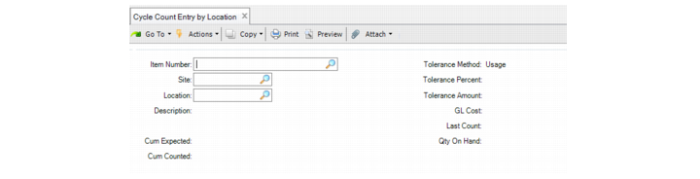
Cycle Count Entry By Location (3.13.1)
Item Number
Enter the item to be counted on the site and location.
Location
Enter the location for the item to be counted.
Site
Enter the site for the item to be counted.
Cum Expected
The system displays the running total of quantity on hand of all entered serial IDs.
Cum Counted
The system displays the running total of counted quantity of all entered serial IDs.
Tolerance Method
The system displays the Tolerance Method in the system.
Tolerance Percent
The system displays the Tolerance Percent in the system.
Tolerance Amount
The system displays the Tolerance Amount in the system.
GL Cost
The system displays the GL Cost in the system.
Last Count
The system displays the last count of the item.
Qty on Hand
The system displays the quantity on hand of the item.
Serial ID
Enter the pack or item serial ID to be counted.
Note: If the serial ID you enter is associated with another location, as long as no open warehousing task exists for this item/site combination, the system still does the count. The system automatically transfers the items to the current location after the batch is closed successfully.
Note: When you click Back on the Serial ID field, the system prompts you to complete the cycle count.
When you click Delete on the Serial ID field and the serial ID is not in the count list, the system displays an error message. Otherwise, the system removes the serial ID and all its lower-level packs from the count list, and updates the Cum Expected and Cum Counted values.
Item Serial ID
Enter the item serial ID, one item at a time, when an item is serialized.
Quantity Counted
The system displays the items counted in the entered unit pack. When the item is serialized, this field is the running total of entered Item Serial ID of the unit pack and is display only.
Lot/Serial
For a loose item, enter a valid lot/serial ID. For other scenarios, this field is display only.
System Quantity
The system displays the quantity on hand in the system.
Reference
For a loose item, enter any reference data for the items. For other scenarios, this field is display only.
Amount Variance
The system displays a value in this field when you close the batch.
Annual Usage Variance
The system displays a value in this field when you close the batch.
Quantity on Hand Variance
The system displays a value in this field when you close the batch.
Remarks
The system displays any remarks associated with this transaction.
Effective Date
The system displays the GL effective date of the transaction
Debit Account
The system displays the GL debit account of this transaction.
Cr
The system displays the GL credit account of this transaction.
Amount
The system displays a value in this field when you close the batch.
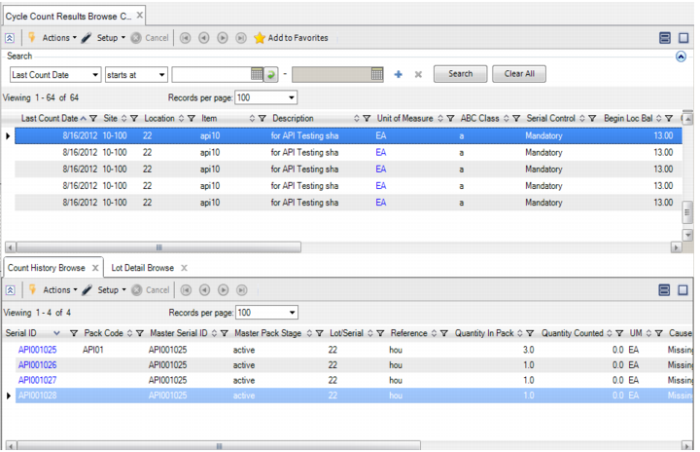
Cycle Count Results Browse Collection
Use the Cycle Count Results Browse Collection to view cycle count data for serialized items or packs. The top portion of the browse displays the last counted data, including the count date, item, site, descriptions, the ABC class, the item serialization control setting (mandatory, and so on), the location’s beginning balance, quantity counted and changed, QOH variance, usage, and so on.
The supporting browses display the count history and the lot detail. Cycle Count Results by Pack lists summary information for each batch.
The following table presents pertinent serialized data fields in the displays and explains the data.
Fields with Serialized Data
Field | Description |
Serial Control | Indicates whether the item is serialized. |
In Process | Indicates whether the batch is still active. |
Status | The status of the cycle count: Initial, Error, or Recount. |
Detail browse - Count List | All serial IDs counted for the batch are listed. If users already tried to close the batch, then missing packs are also listed |
Serial ID | When the serial ID does not exist in the system, then only the serial ID is displayed. If loose items are counted, when the item is non-serialized, the serial ID is blank. When the serial ID does not match with the data in the system, the reason is described in the Cause column. Manual Intervention indicates whether users need to manually fix the problem. |
Cycle Count Results Browse Collection