Exporting Data
You can export data to third-party products using Serial Usage Export and Serial Booking by WO. You use QXtend QDocs to export the data. When you do, the system updates the Serialization data. The following table summarizes export capabilities:
Import Data
|
Third Party
|
Data Imported
|
Description of Import
|
|
Covectra/ SAP ALL
|
Export Unused/Consumed Serial numbers
|
Lets you export unused and consumed serial IDs when the SO (or customer scheduled order) is completely shipped and the SO shipper is confirmed using Serial Usage Export. See Serial Usage Export. |
|
Systect
|
Serial Booking by WO
|
Lets you export all serial numbers that the system booked for a specific WO. The system triggers the outbound QDoc using QXO when you release the WO. The QDoc includes serial IDs. The QDoc includes a complete list of all serial numbers booked for the WO, not ranges.
|
Serial Usage Export
Use Serial Usage Export (3.17.20) to export unused and consumed serial IDs when the SO (or customer scheduled order) is completely shipped and the SO shipper is confirmed. You can export when you book a range of serial IDs for a particular SO line after you close the SO, or the system fulfills the order line.
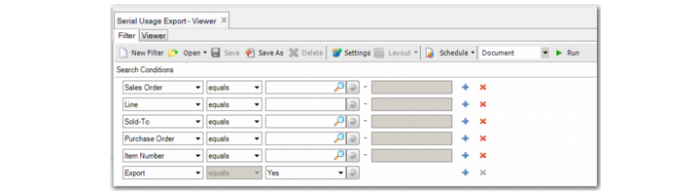
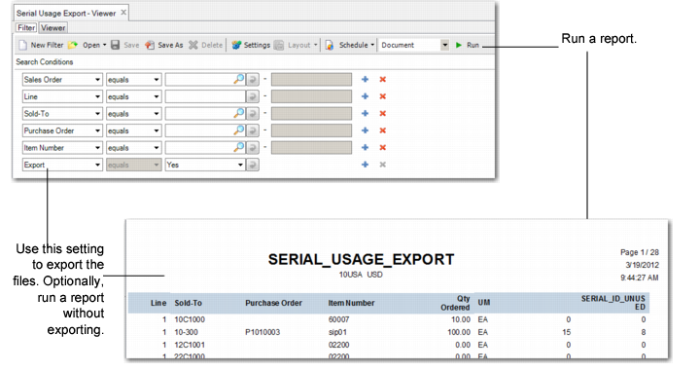
In the .NET UI, specify a range of sales orders and lines, sold-to, purchase orders, and item numbers.
You run the Serial Usage Export function to trigger outbound QDocs that notify the customer which serial IDs are used or not and to view the usage report before you export the outbound QDoc.
Set Export to Yes to generate an outbound QDoc. The system generates a QDoc that contains used or unused serial data along with a report. You can generate a report without creating the QDoc by setting Export to No.
Serial Usage Export (3.17.20)
Exporting Serial IDs
You can use Serial Usage Export (.NET UI only) to export unused and consumed serial numbers when the SO is completely shipped or the SO shipper is confirmed. So, if you booked a range of serial IDs for a particular SO line, after the sales order is closed or the order line requirement is fulfilled completely, you can manually run Serial Usage Export to trigger an outbound QXtend QDoc that tells the customer which serial IDs are in use or not in use. You can view the usage report before you export.
To export the serial ID data, provide a range of SO, line, sold-to, PO, or item numbers, then use the Export setting to compile the serial ID data, create the QDoc, and create a report to export. When Export is Yes, the system exports the QDoc and the report. When Export is No, you can run the report without exporting and view the serial IDs selected by your criteria before exporting them.
Serial Usage Export