Setting Up Calendar Exceptions
If shift patterns vary because of overtime, increased or reduced shifts, or plant shutdowns, enter exception hours—that is, variations from the associated shop calendar. Set up exceptions for a date and shift by specifying the number of hours that are added to or subtracted from normal work hours.
You can apply calendar exceptions at any level of the calendar, from the domain down to the lowest level, using the associated menu function:
• Domain Calendar Exceptions Maint (36.2.4.4)
• Site Calendar Exceptions Maint (1.1.22.4)
• Production Line Cal Except Maint (18.1.22.3)
• Work Center Calendar Excpt Maint (14.18.4)
• Process Calendar Except Maint (17.1.14)
• Supplier Calendar Except Maint (5.5.1.4)
Additional .NET UI-only programs let you define full-day exceptions for certain calendar types. See
Setting Up Full-Day Exceptions.
Note: The system uses exception information only when preparing operation schedules, but not when calculating manufacturing order due dates.
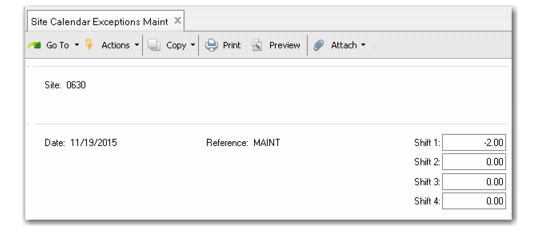
To use the exceptions program, select an existing calendar using the same fields as the corresponding maintenance program. The following example shows Site Calendar Exceptions Maint.
Note: You can only enter exceptions for a defined calendar. For example, if you enter a valid site that does not have a calendar defined, the system displays an error message.
Site Calendar Exceptions Maint (1.1.22.4)
Date
Enter the date to have a calendar exception defined.
Reference
Enter a code representing the reason for the calendar exception. For example, you might enter OT to signify overtime.
Shift 1 - 4
Enter the number of hours (positive or negative) to be included in the calendar exception for each affected shift. If the exception does not apply to a shift, leave the value at zero.
If an exception occurs on a day that is not part of the standard work week, add that exception to an existing day rather than changing the standard work week. Many scheduling programs assume that the work week has a certain number of days. Adding a day to the standard work week can result in inaccurate schedules.