Setting Sequence Values
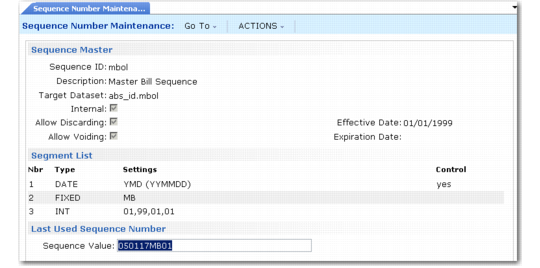
Use Sequence Number Maintenance (36.2.21.5) to set the next value for an existing sequence, when:
• The sequence is internal.
• Allow Discarding is selected.
The default in Sequence Value is the last number that was used. If you update it, the system validates the new value against the segment order and settings. It then increments the new value the next time the sequence is used.
Sequence Number Maintenance (36.2.21.5)
Defining Sequences for Sales Orders
You can define NRM sequences that assign numbers to sales orders in Sales Order Maintenance (7.1.1) and Pending Invoice Maintenance (7.13.1).
1 In Language Detail Maintenance (36.4.2), for Data Set so_seq_id and Field Name seq_type, create one or more mnemonics, assigned to Numeric Code 6 or higher.
Note: Lower numbers are reserved for future functionality enhancements.
2 In Number Range Maintenance, create a new sequence ID and assign it to a dataset with the following value:
so_nbr.mnemonic
Where
mnemonic comes from the language detail record defined in step
1.
You can define multiple sequences as needed if you want to assign order numbers based on site or some other criterion.
When any sequence definition is assigned to a dataset beginning with so_nbr, navigation changes in Sales Order Maintenance and Pending Invoice Maintenance during order entry. The system displays an additional Sequence ID field before assigning an order number. The look-up browse displays only IDs that have a dataset value beginning with so_nbr.
If you select a value, the system uses NRM to generate an order number based on the associated definition. If you leave Sequence ID blank, the system uses Sales Order Control (7.1.24) to determine the next order number.