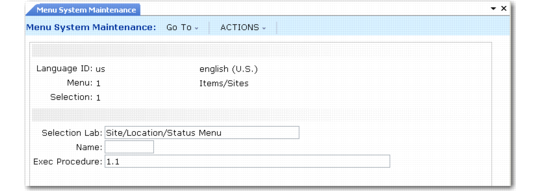
Menu System Maintenance
Use Menu System Maintenance (36.4.4.1) to assign menu labels and execution files to menu numbers.
In the QAD .NET UI, the interface to Menu System Maintenance has been enhanced to make it easier to use. For more information on Menu System Maintenance, see
QAD .NET UI Administration Guide.
You can control the menu numbers and the names associated with programs in several ways.
• Move menu items.
• Change menu names.
• Create shortcut names for menu items.
Note: If you make these changes, they may be lost during software updates when menus are reloaded.
Important: Menus are cached in memory when you log in to the system. You must log out and log in again to see any changes made with this program. In addition, if you add menu items, you must grant access to them before anyone can see them. See the previous section on menus and security.
Menu System Maintenance (36.4.4.1)
The Name field lets you call programs using keywords. For a program buried deep in the menu structure, you can add a name and then execute the program by typing that name on any menu command line.
Example: Many of your users create sales orders. Enter SO in the Name field for 7.1.1. Users can then type SO at the menu prompt or Search box and Sales Order Maintenance (7.1.1) displays.
The execution procedure can be:
• A menu number such as 1.1
• A Progress program such as sosomt.p
• A component-based activity specified in the form of a uniform resource name (URN) such as urn:cbf:BCreditor.Modify
• A process map specified in the form of an URN such as urn:pmap:IndustryProcessLevel1
• A browse collection specified in the form of an URN such as urn:collection:fcb4af10-e778-4db5-9461-766f5b7e2891