Setting Up Menu Substitutions
Use Menu Substitution Maintenance (36.4.4.7) to set up a link between two standard programs so that when users select one from a menu, the other program displays. This is useful for substituting custom versions of existing programs.
Menu substitution affects standard programs in the character UI in these ways:
• Replaces browses with inquiry programs
• Replaces standard programs with custom versions
Note: This program applies to standard Progress programs in the character environment only; you cannot use it with component-based functions and it does not affect the menu in the .NET UI. In the .NET UI, standard programs and browses always display.
In the character interface, which program is invoked for a particular user depends on whether menu substitution is enabled in the user record in User Maintenance (36.3.1).
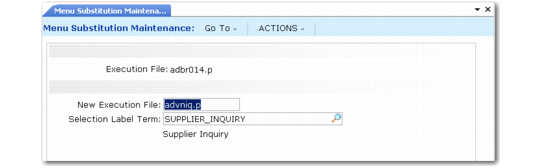
Menu Substitution Maintenance (36.4.4.7)
1 Enter the program name in Execution File. Users selecting this program from a menu will actually be running the one entered into the New Execution File field.
2 Enter the substitute program name in New Execution File. This is the name of the program to replace the one entered in Execution File. Users will run this program when they select the one entered in the Execution File field. You can use wildcards. For example, if you want to replace all inquiry programs with the browse versions, you enter *iq* in the Execution File field and *br* here.
3 Enter a label term in Selection Label Term. The long label contained in this term appears in the title bar and menu list of the substituted program.