QAD 2017 Enterprise Edition
>
User Guides
>
System Administration
>
System Interface
>
Setting User Telnet Options
Setting User Telnet Options
As part of system installation, telnet setup scripts are configured for use by the Connection Manager for managing HTML programs running under the .NET UI. Create additional telnet scripts for running terminal sessions within the QAD .NET UI with User Option Telnet Maintenance (36.4.14).
The QAD .NET UI also reads other settings in this program, including the port value defined in this program to determine which port to use to connect to the server for terminal programs.
Configuring the settings in User Option Telnet Maintenance consists of the following tasks:
• Specifying telnet server settings
• Defining the login sequence
• Configuring the telnet connection settings
• Verifying the script login sequence
Configuring Telnet Server Settings
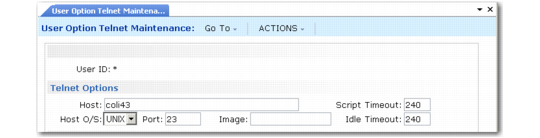
User Option Telnet Maintenance, Telnet Options (36.4.1.4)
Use the following instructions to configure telnet server settings:
1 In User Option Telnet Maintenance, create a record that applies to all users by entering an asterisk (*) in the User ID field; then click Next.
2 Enter values in the following fields
Host
Enter the fully qualified machine name or IP address of the telnet server. The script uses this information to establish the telnet connection.
Host O/S
Enter UNIX for UNIX systems. Enter NT for Windows systems.
Port
Enter the port number for the telnet server. The default value is 23. This is the value you would normally use, unless you are using SSH under the .NET UI. In this case, the port value is 22.
Image
Leave this field blank; it is not currently used.
Script Timeout
Enter the number of seconds (1–999) the system waits for the telnet login script to execute. If this value is exceeded, a time-out message displays and the session closes.
Idle Timeout
Enter the number of seconds (1–999) the system waits after a telnet session begins for a program to execute.
Note: Idle timeout is not used in the QAD .NET UI.