XML Daemon
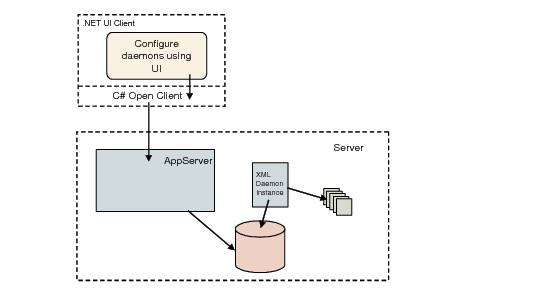
The XML daemon processes external data in the form of XML files; for example, invoices are received in electronic form from a supplier. You store the files in a specific directory on the server and the daemon reads and processes them.
The XML daemon differs from the other daemons in that it creates its own requests.
XML Daemon Architecture
The daemon parses the header of an XML document and decides which software component to call to process the data. It then creates the appropriate request. The daemon reads each XML file once.
The XML daemon processes one supplier invoice for each XML file. If you attempt to use the XML daemon to process an XML file with two or more invoices, the system displays an error message.
The XML daemon can process XML files only. You must convert other text formats to XML according to the QAD-defined XSDs before importing them.
You can generate well-formed schema as a starting point for entering your own data by accessing the program that creates a component and selecting Properties from the component menu. The Properties dialog includes a Dump XML button that lets you generate schema to a designated directory.
Important: The XML daemon can process a maximum of 500 XML files in one iteration.
XML Daemon Actions
The XML daemon reads each XML file to determine what action it must take and how it should handle invalid data.
The XML daemon supports the following activities:
Save
The daemon validates the object and tries to save it. If the validation returns an error, the daemon does not save the object. You can use the Monitor screen to view the error message.
When using the Save action, XML files can contain data for multiple objects.
Save/Create Draft
This activity is similar to Save. However, if the validation returns an error, the XML daemon saves the object as a draft, without validation. In both cases, the queue entry is marked as processed correctly. You can use the Monitor screen to view the status.
When using the Save/Create Draft action, XML files cannot contain data for multiple objects.
Create Draft
The XML daemon does not validate data, and saves the objects as drafts.
When using the Create Draft action, XML files cannot contain data for multiple objects.
Validate
The XML daemon validates the objects and displays the results in the Monitor screen. It does not save data. When the input data is incorrect, the daemon displays the error and marks the queue entry as processed with errors.
When using the Validate action, XML files can contain data for multiple objects.
Note: For the Create Draft feature to work, the object being created must support Save as Draft. Only a subset of business components can be saved as drafts: Banking Entry, Business Relation, Customer, Customer Finance Charge, Customer Invoice, Journal Entry, Petty Cash, Supplier, Supplier Invoice. Also the use of drafts must be enabled in System Settings.
Use the Action to be Performed field in the Daemon Configure screen to specify the next action for the daemon to perform.
The action applies to all XML files and overrules the action defined in the file if you select the Overrule XML Action field in the XML Daemon, Configure screen.
Configure
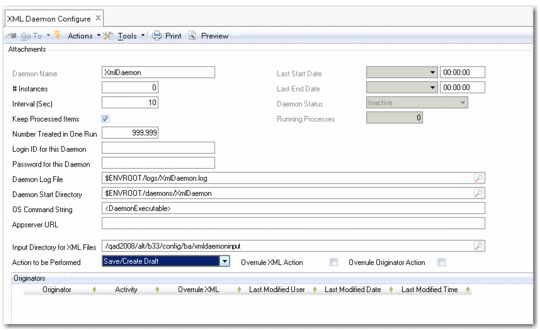
The XML Daemon Configure screen lets you configure the XML daemon and differs from the Maintain screen of the other daemons.
The settings in XML Daemon Configure instruct the daemon to convert an XML file into a daemon request and how to process it. Only the settings that are unique to the XML Daemon are described here; the others are the same as the general settings discussed with the History Daemon Configure screen on
here.
XML Daemon, Configure (36.14.16.6.1)
Field Descriptions
Input Directory for XML Files
Specify the directory that the daemon scans for XML files.
Note: You must specify an input directory to enable the daemon process.
Action to be Performed
Optionally, choose the action that the XML daemon must perform on the data in the XML file. If not specified, the action is read from the XML file.
Overrule XML Action
Select this field to overrule the action specified in the XML file with the action defined in the Action to be Performed field.
Overrule Originator Action
Select the field to overrule the action based on the originator and according to the rules defined in the grid.
The Originator field is part of the header section of the XML file and indicates the origin of the file; for example, a source application or external party.
Originator
Specify the originator for which to perform the overrule action.
Activity
Select the default activity to perform on loaded XML files. The options are:
• Save
• Save/Create Draft
• Create Draft
• Validate
Overrule XML
Select the field to overrule the action specified in the XML file with the action defined in the Activity field.