QAD 2017 Enterprise Edition
>
User Guides
>
System Administration
>
System Control
>
Managing Draft Objects
Managing Draft Objects
Enabling the Save as Draft and Browse Drafts options in Change System Settings lets users create draft instances of a subset of components.
System administrators may need to monitor these draft records to ensure that none are left unattended in the system.
You can use the Draft Object activities (36.24.9) to view, modify, delete, or complete draft objects.
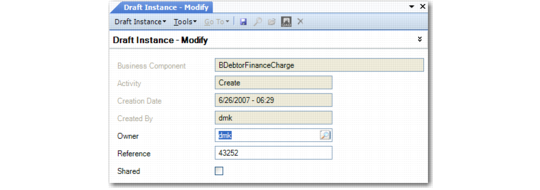
When you modify a draft object, you can assign it to a new owner, change the name by which it is referenced, or modify whether the object can be viewed by others.
After selecting an object in the view, choose Modify from the right-click menu.
Draft Object Modify (36.24.9.3)
Owner
Specify a new owner for this draft instance if needed. The new owner can modify and complete the draft instance.
Reference
Modify the name of the draft instance if needed.
Shared
Select this field if you want this draft instance to be visible to others.