System Control
This chapter describes essential configuration tasks and administrative options.
System Control OverviewExplains the functions of the System Control menu.
Database ControlExplains how to use Database Control.
System MaintenanceExplains how to manage system settings using System Maintain, System Synchronize, System View System Codes, System Monitor, the Set Debug Level option, and the CT log file. It also covers server.xml.
Configuring System and User SettingsDiscusses system and user settings and how to change them.
Making UI Caching ConfigurableExplains how to configure the system to prevent the UI from automatically caching the result of method calls.
Configuring WorkflowExplains how to configure and change the workflow.
Managing Draft ObjectsExplains how to use Draft Object Modify.
System Control Overview
The functions on the System Control Menu (36.24) let you configure and manage settings at the database level. The System Administration function lets you perform the administration tasks required to configure and monitor QAD Financials. These include tasks to:
• Define database control settings.
• Configure system and user settings.
• Set up workflow.
Database Control
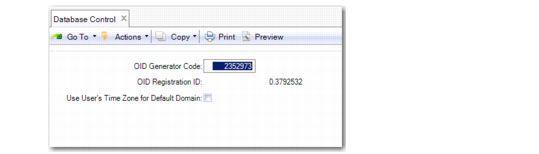
Use Database Control (36.24.1) to set the time zone of the database server and to register a code for defining unique record identifiers. You should do this before defining users since the time zone specified here defaults when new user records are created.
Database Control (36.24.1)
OID Generator Code
The OID Generator Code in Database Control is used to assign unique object identifiers (OIDs) to database records for auditing purposes. The code is assigned during system implementation.
Based on the OID generator code, the OID fields in the database are populated using an algorithm that ensures uniqueness across all records, tables, and QAD databases within the company. The value stored in the OID field for each record has the following decimal format:
<date><seq_value>.<registration_id>
Where:
<date> is the server date with format yyymmdd.
<seq_value> is obtained from a Progress database sequence.
<registration_id> identifies the origin of the OID value.
The registration ID is derived from the OID generator code by reversing the digits of the generator code value and placing the decimal point in front of the result.
Use User’s Time Zone for Default Domain
The Use User’s Time Zone for Default Domain field in Database Control (36.24.1) affects the time stamping of transactions you create in the default domain. If the Use User’s Time Zone for Default Domain field is selected, all transactions you create in the default domain are dated and time stamped according to the user time zone specified in User Maintenance (36.3.1), even if a different time zone is defined for the domain in the Domain record.
If the Use User’s Time Zone for Default Domain field is deselected in Database Control (36.24.1), all transactions you create in the default domain use the time zone defined in the Domain record. The Use User’s Time Zone for Default Domain field is deselected by default.
A user’s default domain is set in User Domain/Entity Access Maintain. (36.3.4).
Important: If you are using the optional Service/Support Management module and the Multiple Time Zone option is activated in Service Management Control (11.24) for any domain in the database, you should not activate this field.