Using an Application Server to Run MRP (Example)
This section shows a practical example of how to set up an application server to dramatically improve the performance of MRP.
To use the MRP application server, you need to perform four main tasks:
• Modify the configuration.properties file.
• Configure the application server.
• Defining the application server.
• Start and stop the application server as required.
For more information on MRP, see
QAD Manufacturing User Guide.
Configuring the AppServer
Improved MRP performance requires a single AppServer with multiple threads, which is used to execute the programs that process planning data when you run MRP. Use the following instructions to configure that AppServer.
All QAD Installations
Use this procedure to configure an AppServer instance for all QAD installations.
In the example shown below, the name for the AppServer instance is as-mrp. However, you can use any name, as long as all references to the name are consistent. Add an entry for the required AppServer instance to the configuration.properties file in the build/config directory.
You can copy the following text into the file. Be sure to change the parameters to match your environment. Parameter changes are described after the sample text.
Progress Example
# @extends appserver.mfg
appserver.mrp=
appserver.mrp.name=as-mrp
appserver.mrp.operatingmode=State-reset
appserver.mrp.initialsrvrinstance=12
appserver.mrp.maxsrvrinstance=20
appserver.mrp.minsrvrinstance=12
portNumber=<port number>
appserver.mrp.manual=true
The parameters of interest are described below. Parameters not listed should generally not be changed from the values given in the example.
Important: The first line of the entry specifies the name of the AppServer instance. If this is changed from the name in the example, be sure to change all other occurrences of this name in the other parameters.
portNumber is the port number for the AppServer broker for this instance. The value you specify should be a TCP/IP port number.
Since the AppServer broker
as-mrp is used internally by the QAD software, you must use AppServer Service Maintenance (36.19.1) to define an application server connection master record. See
Defining the AppServer.
Defining the AppServer
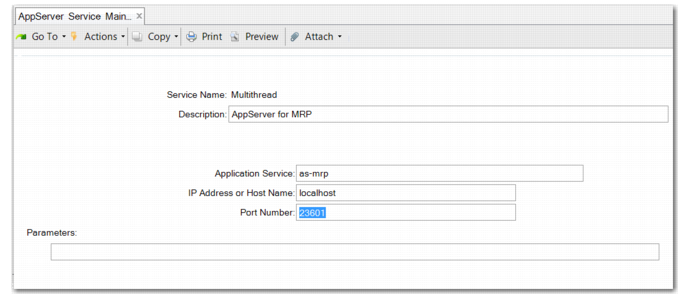
Use AppServer Service Maintenance (36.19.1) to define the information needed to connect to a Progress AppServer.
You can specify a set of standard connection parameters used to connect to this server. Optionally, you can also define server-specific parameters required by the AppServer.
AppServer Service Maintenance (36.19.1)
Service Name
Enter a name to identify this application server.
Description
Optionally, enter a description of the application server.
Application Service
Enter the name of the application server defined in the configuration.properties file.
IP Address or Host Name
Enter the IP address or host name used as the ‑H parameter when connecting to this application server. This is the IP address or host name of the machine on which the application server is running. If the application server is running on the same machine as your QAD database, enter localhost.
Port Number
Enter the name server port number.
Use the following command to retrieve the port number of the name server:
yab config ns.portnumber
ns.portnumber=23601
Parameters
Optionally, enter any other parameters required when connecting to this application server.
Starting and Stopping the Application Server
QAD Enterprise Edition is installed using the QAD Enterprise Edition installer and is managed using the Enterprise Edition Administration Console, also known as YAB. YAB is a deployment and management tool set that covers all products installed into an Enterprise Edition environment.
The application server instance configured in the example on
here can be administered using the
yab command. You must have Progress administrative privileges to execute
yab commands.
Important: Make sure that all databases to be connected to the application server are running before you start the application server.
The command usage is as follows:
• To apply or reapply the application server configuration to the system:
> yab reconfigure
After applying the configuration to the system, you can start and stop the application server, as needed.
• To start the MRP application server:
> yab appserver-mrp-start
• To stop the MRP application server:
> yab appserver-mrp-stop
• To see the application server status:
> yab appserver-mrp-status
• To have the application server start and stop with the rest of the components in the environment, adjust the following setting:
appserver.mrp.manual=false
• To display help for all application server settings:
> yab help appserver