Customer Payments in Bank File Import Lines
This section contains flows and sequence diagrams to indicate how Process Incoming Bank Files processes customer payments. It also describes the variable you use to activate the customizable matching logic.
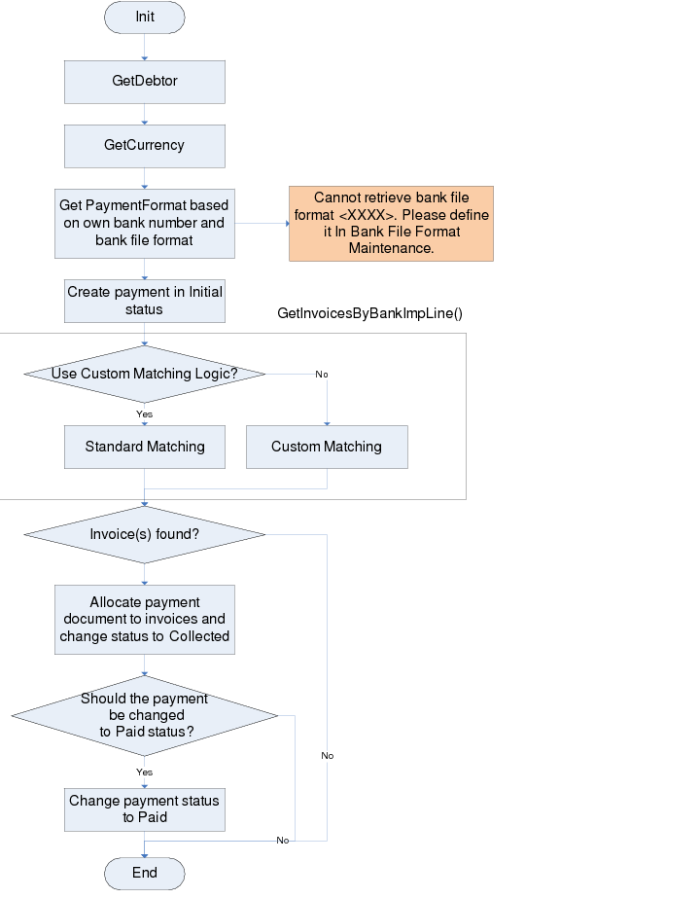
Customer Payments, Main Flow shows the customer payments flow and indicates the point at which the matching logic is used.
Customer Payments, Main Flow
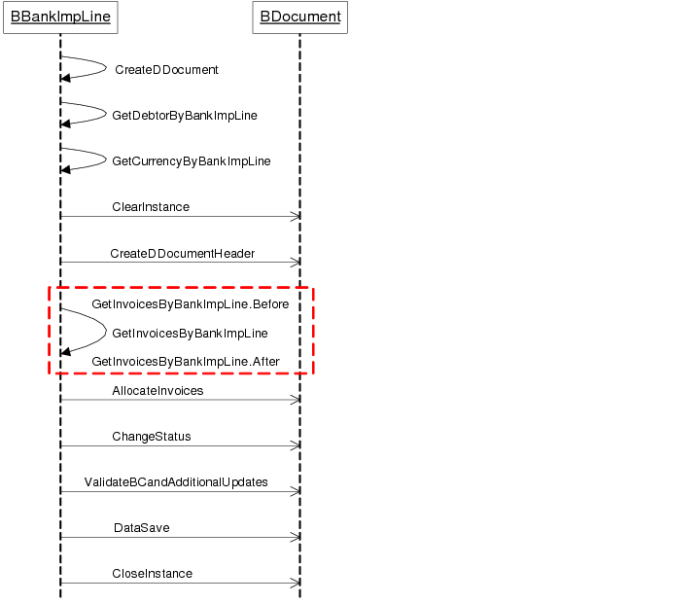
Customer Payments Flow—Sequence Diagram
BankImpLine.GetInvoicesByBankImpLine.Before()
In order to use the customizable matching logic instead of the standard matching logic, set the vlUseCustomMatching variable to Yes in the GetInvoicesByBankImpLine.Before method. To disable the customizable matching logic, set the variable to No.
In the non-intrusive framework, a standard method variable cannot be shared with its .Before or .After method. Therefore, the vlUseCustomMatching variable is defined at class level, and the program calls the SetPublicData and GetPublicData methods to store and retrieve class variables.
PROCEDURE BBankImportLine.GetInvoicesByBankImpLine.before:
DEFINE VARIABLE viReturn AS INTEGER NO-UNDO.
DEFINE VARIABLE vcCustom AS CHARACTER NO-UNDO.
DEFINE VARIABLE vlUseCustomMatching AS LOGICAL NO-UNDO.
/* ================================================================================ */
/* if using custom matching logic, return directly without executing standard matching logic. */
/* ================================================================================ */
ASSIGN vlUseCustomMatching = YES.
ASSIGN vcCustom = IF vlUseCustomMatching THEN "true":U ELSE "false":U.
RUN SetPublicData(INPUT "vlUseCustomMatching", INPUT vcCustom, OUTPUT viReturn).
END PROCEDURE.
BankImpLine.GetInvoicesByBankImpLine()
The BankImpLine.GetInvoicesByBankImpLine()method stores the standard matching logic. If the vlUseCustomMatching method variable is set to Yes, the program does not execute the standard logic in the method, and continues to execute the .After method.
BankImpLine.GetInvoiceByBankImpLine.After()
If the vlUseCustomMatching method variable is set to Yes, the program executes the customizable matching logic in the .After method and its sub method BBankImpLine.GetInvoicesByBankImpLineXref.
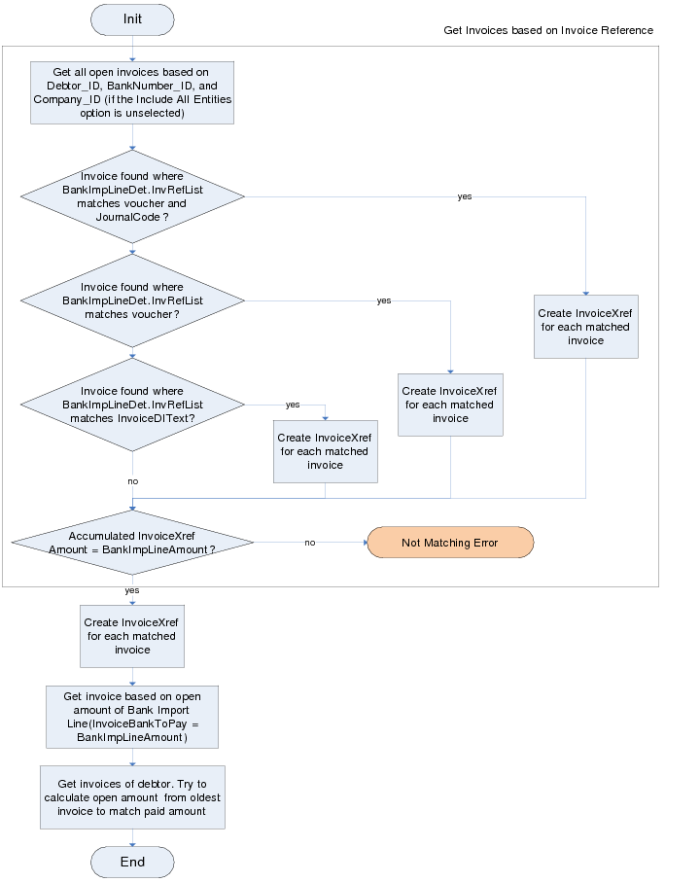
GetInvoices, Main Flow
BankImpLine.GetInvoicesByBankImpLineXref
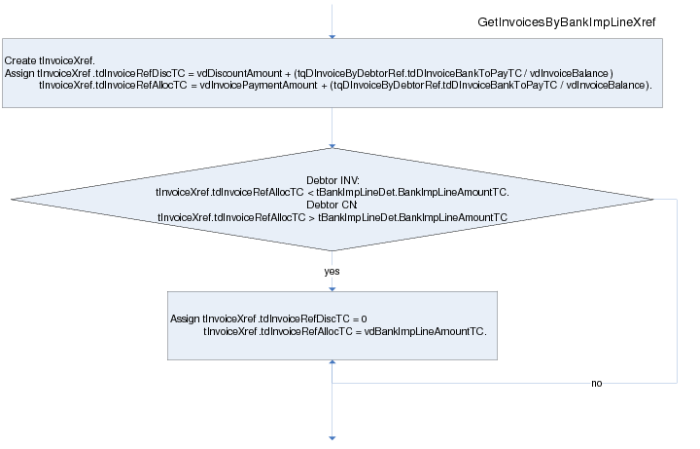
The BBankImpLine.GetInvoicesByBankImpLineXref method creates invoice cross-references used to allocate invoices to payments. This method has a similar customization structure to the BBankImpLine.GetInvoicesByBankImpLine.Before and BBankImpLine.GetInvoicesByBankImpLine.After methods.
GetInvoicesByBankImpLineXref, Main Flow
The BBankImpLine.GetInvoicesByBankImpLineXref method also controls the allocation of partial customer payments. If partial payments are enabled and if the bank file contains a customer open item with a matching daybook and voucher reference, and the bank file import amount is less than or equal to the open invoice amount, the bank import line payment amount is applied against the open item.
You can disable partial allocation by commenting out the following code:
/* if tDInvoiceByDebtorRef.tdDInvoiceOriginalDebitTC - tDInvoiceByDebtorRef.tdDInvoiceOriginalCreditTC > 0
then do:
if tBankImpLineDet.BankImpLineAmountTC - tInvoiceXref.tdInvoiceRefAlloTC < 0
then do:
assign tInvoiceXref.tdInvoiceRefDiscTC = 0
tInvoiceXref.tdInvoiceRefAlloTC = tBankImpLineDet.BankImpLineAmountTC
tInvoiceXref.tdInvoiceRefAlloTC = dynamic-function("RoundAmount",tInvoiceXref.tdInvoiceRefAlloTC, ?, tDInvoiceByDebtorRef.tcCurrencyCode).
end.
end.
else if tDInvoiceByDebtorRef.tdDInvoiceOriginalDebitTC - tDInvoiceByDebtorRef.tdDInvoiceOriginalCreditTC < 0
then do:
if tBankImpLineDet.BankImpLineAmountTC + tInvoiceXref.tdInvoiceRefAlloTC > 0
then do:
assign tInvoiceXref.tdInvoiceRefDiscTC = 0
tInvoiceXref.tdInvoiceRefAlloTC = - tBankImpLineDet.BankImpLineAmountTC
tInvoiceXref.tdInvoiceRefAlloTC = dynamic-function("RoundAmount",tInvoiceXref.tdInvoiceRefAlloTC, ?, tDInvoiceByDebtorRef.tcCurrencyCode).
end.
end.
assign tInvoiceXref.tdInvoiceRefAlloTC = tInvoiceXref.tdInvoiceRefAlloTC+ tInvoiceXref.tdInvoiceRefDiscTC. */
Changing the Customer Payment Status to Paid
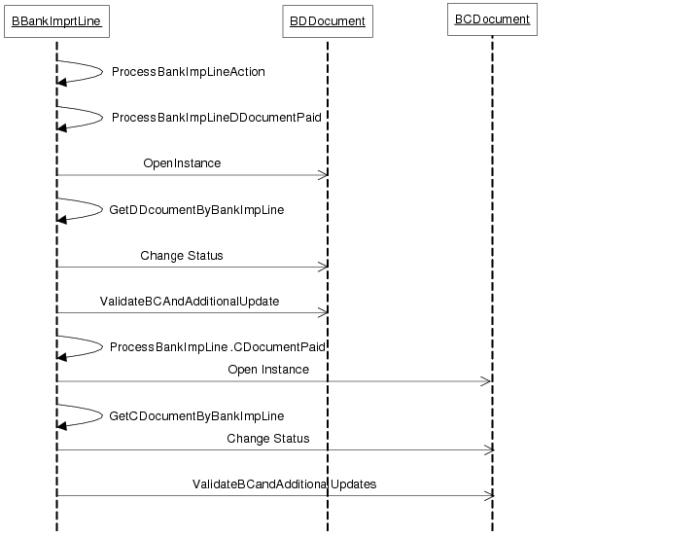
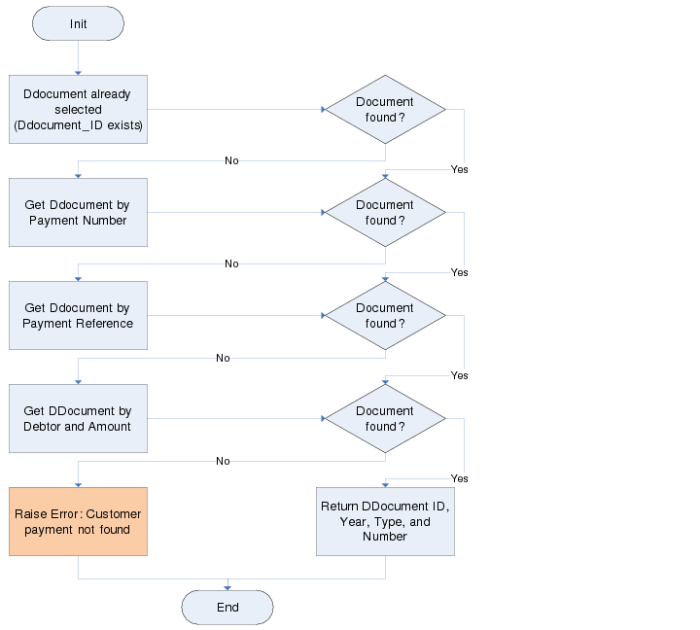
If you want to change the status of a customer payment to Paid, the application calls the GetDDocumentByBankImpLine method to search the DDocument table, which then matches the banking import line.
The GetDDocumentByBankImpLine method has the same customization structure as GetInvoicesByBankImpLine.
GetDDocumentByBankImpLine, Sequence Diagram
GetDDocument, Main Flow
Changing the Supplier Payment Status to Paid
The GetCDocumentByBankImpLine method is similar to the GetDDocumentByBankImpLine method, and is used to set supplier payments to Paid.
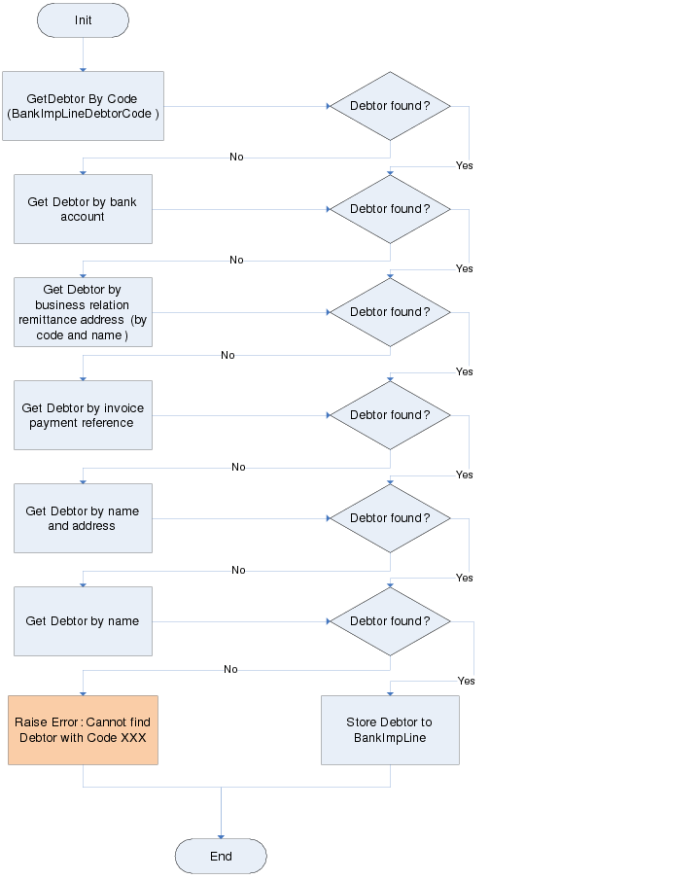
Get Debtor
GetDebtorByBankImpLine, Main Flow illustrates the process used to locate the customer code (debtor code) value in the
GetDebtorByBankImpLine method.
GetDebtorByBankImpLine, Main Flow
Get Creditor
The Get Creditor method functions in the same way as Get Debtor, but is used to retrieve the supplier code (creditor code).