Batch Processes
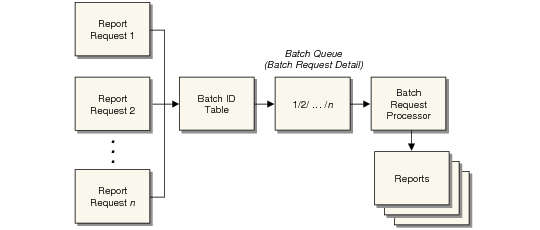
A batch process is a group of processes run simultaneously. You can use batch functions to defer processing and report printing for reasons such as the following:
• A printer is busy or broken.
• Users want to be able to continue working without having to wait for lengthy reports to finish.
• Reports need to be run in a sequence, regardless of how they are submitted.
• You want to balance system load by running CPU-intensive programs when system load is low, perhaps at night.
Note: Batch reporting for Financial reports is handled by the Report Daemon and .Net Report Service. See
Report Daemon.
Define Batch IDs
To set up a batch process, system administrators first create batch IDs in Batch ID Maintenance (36.14.1). Use ID names that are descriptive and easy to remember, such as Paycheck, Monthly, or After5. You also assign the batch a priority that determines when it will run. Requests with the highest priority are run first.
Users then submit reports or programs that can be run in batch mode and specify the batch ID.
Note: Batch IDs are domain specific. You must set up a separate set of IDs for each domain. You can, however, manage batch processes from multiple domains in the batch processing programs.
Batch Processes