QAD 2017 Enterprise Edition
>
User Guides
>
System Administration
>
Database Management
>
Component Record Numbering
Component Record Numbering
The Record Numbering function lets you set a starting number for a specific business component, for example, numbers for printed checks. Numbers are always generated by financial year and by entity.
Usually, the number is reset to one at the beginning of a new fiscal year, but you can also set it to a certain value during the accounting year. To add a new number, right-click in the grid and choose Add New Row.
Note: It is recommended that only experienced system administrators use this feature. Changes to the numbering system are logged for audit, and unauthorized changes could lead to issues of accounting legality where gaps in the numbering sequence result.
For external daybooks, sequence numbers are generated by the external transaction. However, the numbering function still generates a number series, which will be unused. The system also validates duplicates when numbers are passed from an external application. For transactions originating externally, the Record Number function is only used if a sequence number is not passed from the external system.
The Record Number function supports a single activity, Maintain, which lets you modify the numbering system. You cannot modify an existing number, but you can right-click and add a new row, to reset the sequence for a numbering type.
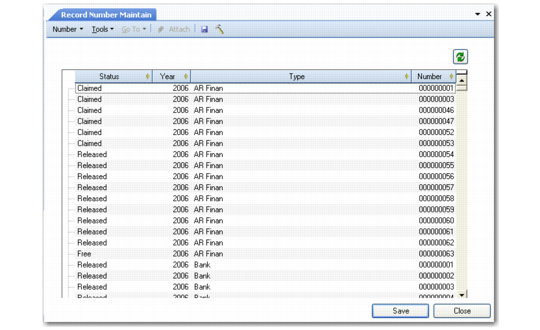
Record Number Maintain (36.16.21.2)
Field Descriptions
Status
Displays the status of the number. When creating a number record, the field is automatically filled with the status Free.
The numbering statuses are as follows:
Free: The number is being used for the first time.
Claimed: The system selects the lowest available number in the series with the status Free or Released. If the transaction has not been saved, the system assigns the status Claimed to the number. When the transaction is saved, the system removes the number from the list of available numbers. If the transaction is not saved, the system assigns the status Released to the number.
Claimed numbers are currently being used by a running transaction.
Example: Numbers 18 and 19 are claimed by running transactions. The transaction that claimed sequence number 18 is abandoned and 18 is released. Sequence number 18 then becomes the next available number, even though 19 is already used.
The Claimed status is also required because, in a client-server environment, if the connection is lost, the number will remain claimed on the client side. This is repaired the next time the server is started and system housekeeping takes place.
Released: The number was used previously for a transaction that was not saved. The system releases the number again for use for the next transaction.
Draft: The number is used in a draft object. If the object is deleted, the system sets the number status to Released. The system removes the number from the list of available numbers when the user saves the draft object.
Year
Specify the accounting year for which you want to create a numbering sequence. The combination of the number year and type must be unique within the entity.
Type
Specify the accounting daybook or number series for which to create the number series. The combination of the number year and type must be unique within the entity.
Number
Specify the first number in the numbering sequence. If you do not specify an initial value, the system starts with 1. Each value in the sequence is incremented by one.