Database Management
This material covers utilities for monitoring database size, performing dumps and loads, reloading archive files, managing database sequences, registering applications, and monitoring license compliance.
Managing Database SizeExplains how to determine disk usage and free disk space.
Dumping and Loading DataDiscusses dump/load procedures.
Deleting and Archiving DataLists transactions that can be deleted or archived. Provides information on GL Audit Detail Delete/Archive and on restoring archive files.
Integrity LoggingExplains how to use the Corrupt Logging function.
Registering LicensesGives a licensing overview; explains how to use License Registration and run license reporting.
Managing Database SequencesExplains how to initialize sequences, maintain sequences manually, maintain sequences using CIM, maintain audit trails, and maintain sequences in Oracle.
Component Record NumberingExplains how to use Record Number Maintain.
Setting Up Multiple Time ZonesExplains how to use Multiple Time Zones Maintenance, use Multiple Time Zone Load Utility, and set a default time zone.
Managing Database Size
You can use system utilities for managing the size of your database.
Determining Disk Usage
Use Database Table Size Inquiry (36.16.1) to dump selected tables and review their sizes. The program requires adequate free disk space to run. Reported table sizes may be understated since indexing overhead is not taken into account.
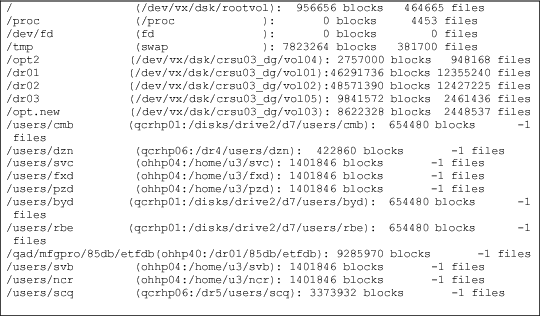
Use Disk Space Inquiry (36.22.13) to display free space for each available disk, in blocks. For most UNIX environments, a block is typically 1024 bytes. For Windows environments, blocks range from 1024 to 8192 bytes. Consult your hardware manuals for exact specifications.
Note: These programs must be run from a character user interface.
Disk Space Inquiry (36.22.13)
Freeing Disk Space
There are three ways to reduce the size of a Progress database:
• Use dump/load programs to compact your data. Compacting data can increase disk access speeds significantly. To do this, dump all data from your database, and reload it into an empty database. You need free disk space amounting to about 70% of the total size of your data (.d) files. Progress recommends that you dump/load once a year.
• Use delete/archive programs to create free database space. Typically, the largest tables in a database contain history, sales order, and purchase order data. The amount of disk space may decrease if you store the archived data on the same disk. See
Deleting and Archiving Data.
• Use both dump/load and archive/delete programs. To do this, remove records from the database, dump the remaining data, and reload it into an empty database. You need plenty of free disk space to do this.