Printers
This section describes how to set up and use printers.
Introduction to Printer ManagementIntroduces the Printer Management menu.
Defining Printer TypesExplains how to use Printer Type Maintenance.
Setting Up PrintersExplains how to use Printer Setup Maintenance and define a printer for use with the QAD .NET UI.
Setting Default PrintersExplains how to use Printer Default Maintenance.
Defining Document FormatsExplains how to define document formats.
Introduction to Printer Management
You can send reports, inquiries, and browses to a variety of printers—both local and network. The Printer Management menu (36.13) contains programs for setting up system printers and default printers by user or group. Printers apply to all domains in a database.
Defining Printer Types
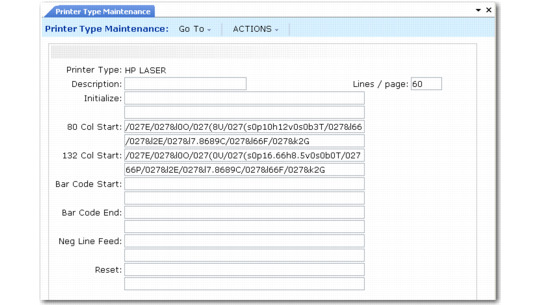
Before setting up printers, define printer types using Printer Type Maintenance (36.13.1).
Printer Type Maintenance (36.13.1)
Printer Type
Select your printer type from the list of predefined types. If your printer type is not in the list, use a similar printer type or define a new one.
To define a new printer type, you specify a series of programming sequences to control printer characteristics and behavior in the following situations:
• 80-character-width print jobs
• 132-character-width print jobs
• Barcode print jobs
• Hardware initialize and reset
Using control characters, you define how your printer performs such tasks as modifying fonts, changing page orientations, producing multiple copies, and so forth. Your printer manual is the best resource for control code definitions.
Note: Without correct control codes, the related aspect of printer control will not work.
Use normal ASCII characters in the control fields. For nonprinting characters, also called control characters, use a slash and the three-digit ASCII number for the character.
Control Characters lists characters frequently used in control sequences.
Control Characters
Control Character | ASCII |
Backspace | /008 |
Tab | /009 |
Linefeed | /010 |
Form Feed | /012 |
Carriage Return | /013 |
Escape | /027 |
Default system data includes correct control sequences for some commonly used printers.
Note: One of the default printers is terminal. Use terminal in a character interface and page in the QAD .NET UI.
Sample Printer Control Codes
Code | Function |
/X27E | Printer reset |
/X27&l3A | Folio paper format |
/X27&lXO | Portrait orientation |
/X27&l1O | Landscape orientation |
/X27&l1S | Long edge binding (prints on both sides) |
/X27&l66F | Bottom margin is 66 lines from top |
/X27(sXp16.67h8.5vXsXbXT | Pitch 16.67, height 8.5, default style, thickness, font |
/X27&l7X89C | Adjusts vertical index in steps of 1/48 inch |
/X27(sXp16.67hXs3b4X99T | Pitch 16.67, height default, bold, courier (4X99) |