Warehouse Location Groupings
QAD Warehousing manages the movement of inventory within and between warehouses by defining pathways that take the inventory from one part of the warehouse to another. These pathways are called internal routings, and defining them involves specifying a sequence of steps that determine which part of the warehouse the next step goes to and any specific controls that should be applied at each step.
The parts of the warehouse involved in these internal routings are the major breakdown of the warehouse storage locations into areas that have a specific purpose. In the warehousing system, the top-level grouping of the storage locations is known as an internal routing group (IRG).
Example: You define an internal routing group for receipt, another for bulk storage, and another for dispatch. Each internal routing that specifics route for inventory to take through the warehouse involves moving the inventory from one of these groups to another.
The next level below the internal routing groups is the storage location group (SLG). All the storage locations within an IRG can have the same basic function, such as bulk storage, but the use of SLGs enables you to group your storage locations in more specific ways. For example, you can group all the locations in which a particular type of item is stored, or that have a common purpose, such as a primary picking area within bulk storage.
In parallel with the storage location groups is another way of grouping locations called the work location group (WLG). This way of grouping locations enables you to account for factors related to working practices. For example, you can specify the printers to use, and the format of the printed output, for each separate work location group.
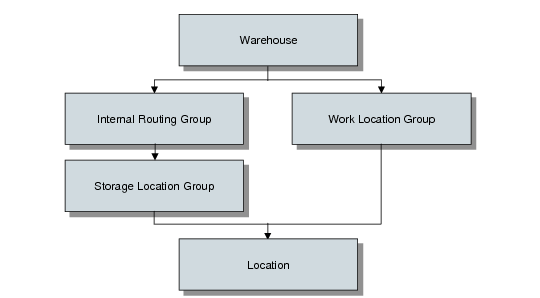
When you have set up all the groupings within a warehouse, every location belongs to a particular storage location group as well as a particular work location group. Each SLG is defined as being within an internal routing group. The hierarchy of these groupings is shown in
Warehouse and Groups.
Warehouse and Groups
Part of the flexibility of the warehousing system comes from the fact that you can set up as many IRGs as you need within a warehouse, you can set up as many SLGs as you need within each IRG, and you can set up just one WLG, or as many as you need for your different working areas.
No rules govern the type of internal routing groups that you have to set up in a warehouse. Most users define areas such as receipt, inspection, storage, picking, packing, and dispatch. However, none of these are mandatory—you choose the areas you want, and you then choose the routes through these areas that you want your inventory to take.
Note: You use IRGs to distinguish between the major functional areas of your warehouse. Although you have as many IRGs as you need for the goods-in and goods-out areas, you normally need only one or at the most two IRGs in your main storage area. Within your main storage IRG, you use SLGs to distinguish between the different types of storage areas.
QAD Warehousing recognizes two basic types of internal routing group: functional and non-functional. The functional IRGs are areas that have a particular warehousing function, such as receipt or dispatch. Non-functional IRGs are used for storing inventory. The difference between the two types is the way in which locations in the group are considered when putting inventory away:
• In functional IRGs, the system uses routines that simply find a location for the inventory, without considering capacity—the location-find algorithms.
• In non-functional IRGs, the system uses routines that consider the size and quantity of the inventory, and the available capacity of the locations—the put-away algorithms.
This is because when you are receiving inventory, you simply want to find somewhere to put it in the goods-in part of the warehouse, and when you are shipping inventory, you just want to move it to the goods-out area. In either case, available storage space is not a relevant factor. However, when you are storing inventory—whether in bulk storage or in a picking area—you want the system to choose the most efficient locations that meet your warehouse storage strategy.