QAD 2017 Enterprise Edition
>
User Guides
>
Warehousing
>
Defining Warehouses
>
Control Settings
Control Settings
Two control programs affect the way QAD Warehousing operates:
• Use Warehouse Management Control (4.24) to set a few fields that affect the entire setup.
• Use Warehouse Control (4.1.24) to set system-wide default values for fields that you can specify for individual warehouses. These values default to each warehouse, but you can modify them as required.
Warehouse Management Control
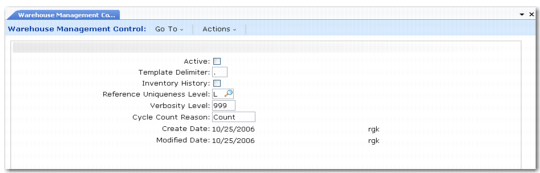
Warehouse Management Control (4.24) is shown in
Warehouse Management Control (4.24).
Warehouse Management Control (4.24)
Active
Indicate whether the system is active. Set this to Yes when you want to implement the warehousing system. If this field is No, none of the warehouse functions operate, and the system uses all the standard functions.
Template Delimiter
Enter the ASCII character to use as the delimiter between fields. This is relevant when data is downloaded to another system; for example, for producing pallet labels. The default is the tilde character (~), but you can enter another delimiter, if required.
Inventory History
Indicate whether the system should keep a permanent history of inventory master records. These relate to movements of inventory with a sizing type of R (reference), where the reference unit of measure is, for example, a pallet. The system creates an inventory master record when the reference stock is received, and this record is moved when the stock is moved, along with the inventory detail records. When the inventory is shipped or broken down into inventory other than sizing type R, the inventory master record is deleted if you set Inventory History to No, or permanently retained if you set it to Yes. Using inventory history lets you perform pallet tracking audits.
Reference Uniqueness Level
Indicate how you want the system to enforce unique pallet reference numbers. Valid entries are:
Blank—References are unique throughout the system.
S—References are unique within each site.
W—References are unique within each warehouse.
L—References are unique within each location.
B—References are unique within each batch/lot/serial.
The L and B options effectively tell the system that the references are not actually unique, but prevent duplicate references being used in the same location or batch.
Verbosity Level
This field determines how many messages the system captures to be displayed on the Verbosity Report (4.23.12.3). You can set a value in the range 0 to 999 depending on the amount of message detail you want include, for example, for use when solving problems.
• Setting a low value such as 10 or 20 causes only the most important system messages to be reported.
• Setting a value of 999 causes all system messages to be reported.
• Setting a value of 0 switches off the function; no messages are reported.
Note: Be careful when setting this field value. Even a low value can affect system performance. It is intended to be used only for trouble-shooting purposes.
Cycle Count Reason
This field sets the default for the reason for generating a cycle count, which you can enter in Cycle Count Generation (4.8.12). You can override the default as required when generating a cycle count.