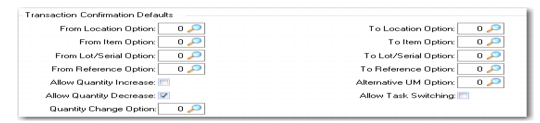
Transaction Confirmation Defaults
Warehouse Maintenance, Transaction Confirmation Defaults illustrates the Transaction Confirmation Defaults frame.
Warehouse Maintenance, Transaction Confirmation Defaults
The fields in this frame determine characteristics of the confirmation of stock movements entered in the warehouse. The values you enter here default to internal routings within this warehouse, but you can change the values for individual routings.
From Location Option
Enter a number to define whether warehouse staff are allowed to modify the From Location aspect of inventory transactions, and, if so, what action is required. The options are as follows:
0 | No change allowed. |
1 | Issue a warning if the From location is changed. |
2 | Request confirmation if the From location is changed. |
3 | Require re-entry if the From location is changed. |
From Item Option
Enter a number to define whether warehouse staff are allowed to modify the From Item aspect of inventory transactions, and, if so, what action is required. The options are as follows:
0 | No change allowed. |
1 | Issue a warning if the From Item is changed. |
2 | Request confirmation if the From Item is changed. |
3 | Require re-entry if the From Item is changed. |
From Lot/Serial Option
Enter a number to define whether warehouse staff are allowed to modify the From Lot/Serial aspect of inventory transactions, and, if so, what action is required. The options are as follows:
0 | No change allowed. |
1 | Issue a warning if the From lot/serial is changed. |
2 | Request confirmation if the From lot/serial is changed. |
3 | Require re-entry if the From lot/serial is changed. |
From Reference Option
Enter a number to define whether warehouse staff are allowed to modify the From Reference aspect of inventory transactions, and, if so, what action is required. The options are as follows:
0 | No change allowed. |
1 | Issue a warning if the From Reference is changed. |
2 | Request confirmation if the From Reference is changed. |
3 | Require re-entry if the From Reference is changed. |
Allow Quantity Increase
Enter Yes if warehouse staff are allowed to increase the quantity when a transaction is confirmed; otherwise, enter No.
Example: You might want sales orders to be picked in whole packaging quantities from Bulk Storage and then split down to the required quantity in a Repackaging area. The internal routing from Bulk Storage to Repackaging would then allow an increase in the original transaction quantity.
Allow Quantity Decrease
Enter Yes if warehouse staff are allowed to decrease the quantity when a transaction is confirmed; otherwise, enter No. This is normally set to Yes, unless your inventory management system can guarantee that sufficient inventory is always available in every possible circumstance.
Quantity Change Option
Specify the action to take when the quantity is changed as controlled by the Allow Quantity Increase and Allow Quantity Decrease settings. The options are as follows:
0 | Accept the change. |
1 | Accept the change and display a warning. |
2 | Accept the change after positive confirmation. |
3 | Force second entry of the quantity to confirm. |
To Location Option
Enter a number to define whether warehouse staff are allowed to modify the To Location aspect of inventory transactions, and, if so, what action is required. The options are as follows:
0 | No change allowed |
1 | Reprompt; must be different location |
2 | Reprompt; can be same location |
3 | Reprompt; can be same location, warn if different |
4 | Reprompt; can be same location, confirm if different |
5 | Reprompt; can be same location, re-enter if different |
To Item Option
Enter a number to define whether warehouse staff are allowed to modify the To Item aspect of inventory transactions, and, if so, what action is required. The options are as follows:
0 | No change allowed |
1 | Reprompt; must be different item |
2 | Reprompt; can be same item |
3 | Reprompt; can be same item, warn if different |
4 | Reprompt; can be same item, confirm if different |
5 | Reprompt; can be same item, re-enter if different |
To Lot/Serial Option
Enter a number to define whether warehouse staff are allowed to modify the To Lot/Serial aspect of inventory transactions, and, if so, what action is required. The options are as follows:
0 | No change allowed |
1 | Blank the lot/serial field |
2 | Reprompt; must be new, non-blank lot/serial number |
3 | Reprompt; allow old lot/serial number |
4 | Reprompt; any value of lot/serial number allowed |
5 | 3 + warning if changed |
6 | 4 + warning if changed |
7 | 3 + confirmation of change required |
8 | 4 + confirmation of change required |
9 | 3 + re-entry of change required |
10 | 4 + re-entry of change required |
To Reference Option
Enter a number to define whether warehouse staff are allowed to modify the To Reference aspect of inventory transactions, and, if so, what action is required. The options are as follows:
0 | No change allowed |
1 | Blank the Reference field |
2 | Reprompt; a new, non-blank reference is required |
3 | Reprompt; allow old reference, blank reference not allowed |
4 | Reprompt; any value of reference is allowed |
5 | Automatically regenerate a new reference |
6 | 3 + warning if changed |
7 | 4 + warning if changed |
8 | 3 + confirmation required if changed |
9 | 4 + confirmation required if changed |
10 | 3 + re-entry required if changed |
11 | 4 + re-entry required if changed |
12 | 5 + Reprompt |
An example of a reference change is to facilitate backflushing. When backflushing is used, either in repetitive production or discrete production (work orders), it is easier to issue inventory if it is as standard as possible: no lot/serial (when possible), and no pallet number (reference). Using option 1 that blanks the reference lets you do that.
Another example is used for multi-bin pickup. When processing a multi-bin pickup movement, it is possible to assign a new pallet number to all items picked during the process. Option 12 that generates a new reference with a possible reprompt is the option to use in that case.
Note: Some of the To Reference options are less accurate than the following alternate UM option. For instance, if an inventory record has a reference and an alternate UM pl and you use To Reference option 1 to blank the reference, the alternate UM pl is still on record, which is wrong. Instead, if you use an alternate UM option to set the Alternate UM field to the item’s default stocking UM (1) together with a UM change action that blanks the reference when going from pl to ea (each), you obtain the expected result. See
Alternate Unit of Measure Maintenance.
Alternate UM Option
Specify the action to be performed regarding any change to the Alternate Unit of Measure field during the transfer of any inventory moved by this sequence in an internal routing. The options are as follows:
.
0 | No change allowed |
1 | Set the Alternate UM field to the item’s default stocking UM |
2 | Reprompt and force entry of a new UM: the item’s default stocking UM is not allowed |
3 | Reprompt, allow use of the old alternate UM, but not the item’s default stocking UM |
4 | Reprompt, allow any value including the old alternate UM or the item’s default stocking UM |
5 | Automatically set the alternate UM to the default of the From storage location group |
6 | Automatically set the alternate UM to the UM of the internal routing |
7 | 3 + warning if changed |
8 | 4 + warning if changed |
9 | 3 + confirmation required if changed |
10 | 4 + confirmation required if changed |
11 | 3 + re-entry required if changed |
12 | 4 + re-entry required if changed |
13 | Automatically set the alternate UM to the default of the To storage location group |
14 | Put-away in base UM, then take SLG acquisition UM |
Allow Task Switching
This field is used to specify for a work location group whether warehouse staff are allowed to switch to a different task. The setting of this field is important whenever any of the task confirmation fields has been set to allow a different value—for example, of a reference or lot/serial number, from that which was expected. You must indicate whether a user who enters a different reference is changing the value for the current task or switching to another task. In Warehouse Maintenance, you set the default for each work location group in the warehouse.
No: Prevent task switching. When a user enters a different value, the system assumes that the value is being changed for the current task.
Yes: Allow task switching. When a user enters a different value such as a reference, the system checks to see whether another task exists with the reference.
When a task is hard assigned, it cannot be switched with another task.
When this field is Yes and staff are confirming a transaction in batch picking, once the user has selected the From inventory, if the scanned data does not match that of the original transaction, the system will try to execute a task switch. Task switching in batch picking is restricted to tasks that belong to the same transaction’s batch.
If it were not possible to switch the task, the system might attempt to execute a lot/serial and reference switch if the Allow Switch Lot Ref flag is activated. There is no restriction to lot/serial and reference switch in batch picking.
Specifying Non-System-Selected Pallets/References
Occasionally, you may need to specify a different pallet or reference other than the one the system selected to fill an order. You can specify a substitute pallet or reference in the same location or another location by setting fields in the Transaction Confirmation Defaults frame:
• From Location Option
• From Lot/Serial Option
• From Reference Option
You must activate the functionality to switch lot/serial references by setting Allow Switch Lot Ref to Yes in:
• Warehouse Maintenance (4.1.1)
• Warehouse Maintenance Control (4.1.24)
• Internal Routing Maintenance (4.2.5)
These fields work together to let you substitute pallets or references, depending upon their settings and whether substitute pallets are available. If substitute pallets do not exist at the current location, you cannot make pallet or reference changes, regardless of the other two field settings, when:
• From Location Option is 0
• From Location Option is 2, but the confirmation of the change is No.
If substitute pallets do exist at the current or another location, you can make pallet or reference substitutions when:
• From Location Option is 0, 1, 2, or 3
• If any Lot/Serial or Reference fields have a non-existent value for the current pallet
Warehouse staff can pick the pallet as long as the system did not:
• Allocated it to another order
• Associate a replenishment task with it (inventory is reserved)
If the substitute pallet has been allocated to another order, or has a task associated with it, then you can switch tasks for the pallet as long as the task associated with it is not active. You can also de-allocate the substitute pallet from its current order by deleting the task associated with the order, creating a new task, and reinitiating the picking algorithm for the task.
If the picking algorithm fails or the system cannot find inventory for the new task, you cannot use the substitute pallet nor switch tasks for it.
Use this field with From Lot/Serial Option, From Reference Option, and Expire Date (Days) to set up picking substitute pallet or lot/serial numbers.
Note: This functionality is only available for tasks that are of PICK type, excluding bulk-picking and only if you use the RF Next Task and RF Select Task for flavors A or B and RF batch picking.