Cycle Count Defaults
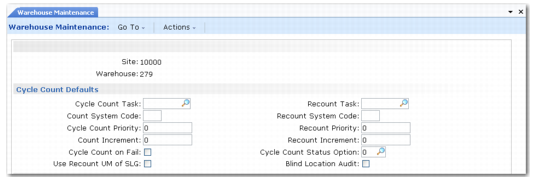
The Cycle Count Defaults frame is shown in
Warehouse Maintenance, Cycle Count Defaults.
Warehouse Maintenance, Cycle Count Defaults
The fields in this frame control the way cycle counts and recounts are performed. The values you enter here default to all work location groups you set up within this warehouse, but you can change the values for individual work location groups.
Cycle Count Task
Specify the task of any cycle counts created in the work location group. The tasks must already have been set up in Task Maintenance.
Warehouse staff perform count tasks when stock quantities are inside the tolerance; they perform recount tasks when stock quantities are outside the tolerance. You define the tolerance in the inventory count parameters specified in Inventory Control (3.24).
Count System Code
Specify the system code associated with any cycle counts created in the work location group. The system code determines the type of screen that is used to confirm cycle count transactions. Leave blank for normal screens; enter RF for RDT screens.
Cycle Count Priority
Specify a priority value for cycle count transactions created in the work location group. The RDTs select the highest priority task as the next action. The higher the number you specify, the higher the priority.
Count Increment
Specify the increment that is added to a cycle count transaction’s priority as time elapses, when you run the increment addition program as a background process. This prevents low priority tasks from never reaching the top of the priority list, and, therefore, never being performed.
Cycle Count on Fail
Indicate whether a cycle count should be automatically generated for the inventory if that inventory is failed, for example, when a transaction is completed for less than the required quantity.
Use Recount UM of SLG
Indicate whether recounts should result in inventory with the alternate unit of measure specified for the storage location group.
This field is especially useful when a CIM load in Cycle Count Entry (3.14) is required to load the stock into the system. The way session triggers work prevents the system from creating the alternate UM correctly. The consequence is an incorrect capacity calculation. When this field is set to Yes, the system gives any pallet recounted in Cycle Count Entry the alternate UM defined in the recount UM of the corresponding storage location group.
Recount Task
Specify the task of any recounts created in the work location group. The tasks must already have been set up in Task Maintenance.
Recount System Code
Specify the system code for any recounts created in the work location group. System codes define the type of screen that is used to confirm recount transactions, blank for normal screens, RF for RDT screens.
Recount Priority
Specify a priority value for recount transactions created in the work location group. The RDTs select the highest priority task as the next action: the higher the number you specify, the higher the priority.
Recount Increment
Specify the increment that is added to a recount transaction’s priority as time elapses when you run the increment addition program as a background process. You use this to prevent low priority tasks from never reaching the top of the priority list, and, therefore, never being performed.
Cycle Count Status Option
Enter a number to define how the system manages the inventory status upon confirmation of a recount or in‑tolerance count in this storage location group. In Warehouse Maintenance, you set the default for each SLG in the warehouse.
The options are as follows:
0 | No status change. |
1 | Change to Location Status: The status of the inventory is changed to the default inventory status of the location. |
2 | Status change based on Fail Status: The status of the inventory is changed to the good status associated with the current fail status specified in the Warehouse Management Data frame in Inventory Status Maintenance (1.1.1). The frame displays only when QAD Warehousing is active. |
Blind Location Audit
Indicate whether you want the recounted quantity displayed on the RF during a cycle recount.
No (the default): The system displays a 0 (zero) on the RF and staff must enter a value for the recounted stock.
Yes: The value of the recounted stock displays on the RF and staff can press Enter to validate the value.