About Internal Routings
QAD Warehousing offers great flexibility regarding the way you handle inventory movements. Any inventory transaction involves a particular item, a particular warehouse, and a particular transaction type such as receipt, transfer, or issue. You can distinguish between items that originate from a particular supplier, or that are destined for a particular customer. The particular combination of these factors creates a special set of requirements for the way the inventory movement is handled.
Example: You can have one very trustworthy supplier of an item whose reliability is such that you do not need to route supplies of the item through an inspection stage. Another supplier of the same item, however, could be less reliable and you therefore, need to inspect all items from this source before putting them away in the warehouse.
Internal routings within the system provide the flexibility to handle such situations. You can set up as many internal routings as you need. Each routing specifies a particular path through different warehouse areas. The first step is to define the different warehouse areas as internal routing groups. Then set up internal routings, each of which describes a path consisting of a sequence of internal routing groups. Finally, assign the appropriate internal routing to each transaction type, combined, where appropriate, with particular items, item types, or addresses.
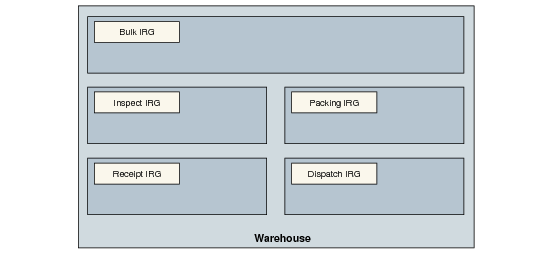
Internal Routing Example shows a simple arrangement of internal routing groups within a typical warehouse.
Internal Routing Example
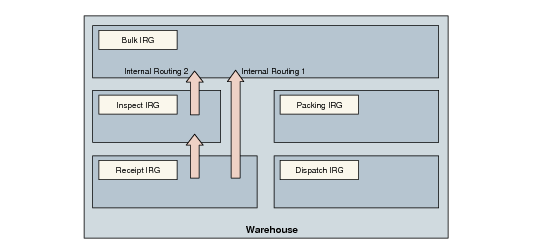
The two internal routings would work as shown in
Internal Routing Example.
Internal Routing Example
Internal routing 1 takes the items directly to Bulk storage from the receipt area, while internal routing 2 takes the items first to the Inspect area, and then to the Bulk storage area.