Internal Routing Group Maintenance
When you have defined your warehouse, the next step is to set up all the internal routing groups (IRGs) within that warehouse. You do this using Internal Routing Group Maintenance (4.2.1). This lets you define a name and a description for each area in the warehouse, and to define whether the area is functional. See
Functional and Non-functional Routing Groups.
You can also specify values relating to issues, receipts, and returns that default to storage location groups within the internal routing group.
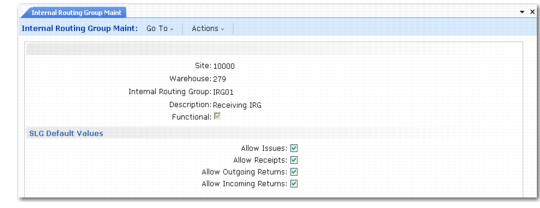
Internal Routing Group Maintenance (4.2.1) is shown in
Internal Routing Group Maint (4.2.1).
Internal Routing Group Maint (4.2.1)
Enter values in the following fields:
Site
Enter the name of an existing site.
Warehouse
Enter the name of the warehouse in which you want to maintain IRGs.
Internal Routing Group
Enter the name of the internal routing group (IRG) that you want to modify or create.
Description
Enter a description of the internal routing group. This is displayed in the lookup when you select the required internal routing groups for each of the sequence steps that define an internal routing.
Functional
Enter Yes if this internal routing group is a functional area, such as receipt or dispatch, in which the system uses location-find algorithms to select locations when stock is moved into the area. Enter No if this is a non-functional area, such as general storage, in which the system uses put-away algorithms to select locations when stock is moved into the area.
Note: You normally need only one IRG, or at the most two, for bulk or general storage: that is, one non-functional IRG. You use storage location groups to define the different types of area within this main storage grouping.