Internal Routing Maintenance
When you have defined the internal routing groups (IRGs) within a warehouse, you can link specific sequences of IRGs together to form internal routings. Each step, or sequence, within an internal routing defines the IRG to which the inventory is next moved. For each sequence step within an internal routing, you also specify a number of fields that control how the inventory is processed as it reaches that point in the sequence.
Default values display form most fields based on settings in Warehouse Maintenance. You can accept the default values or override them with new values.
Remember that a three-step sequence represents two inventory transactions. For example:
|
10
|
Receipt
|
|
20
|
Inspect
|
|
30
|
Bulk
|
The first inventory transaction is the movement from Receipt to Inspect. The properties for this transaction are defined in IR sequence step 20. The second inventory transaction is the movement from Inspect to Bulk. The properties for this transaction are defined in IR sequence step 30.
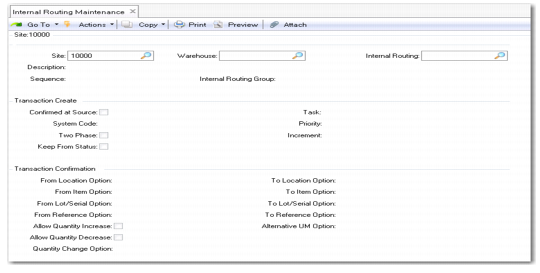
You define internal routings using Internal Routing Maintenance (4.2.5), shown in
Internal Routing Maintenance (4.2.5).
Internal Routing Maintenance (4.2.5)
Enter values in the following fields:
Site
Enter the name of an existing site.
Warehouse
Enter the name of the warehouse in which you want to maintain internal routings.
Internal Routing
To modify the fields for an existing internal routing, enter its name. To create a new internal routing, enter a new name for the routing.
Description
Enter a description of the internal routing. This is displayed in the lookup when you select internal routings for assignment to transaction types within the warehouse.
Sequence
Each internal routing consists of a number of steps, identified by a sequence number. To make it easier to add steps within the sequence later, standard practice is to number the sequences as 10, 20, 30 rather than 1, 2, 3. The process of setting up an internal routing consists of entering a sequence number in the Sequence field, entering the relevant internal routing group in the next field, and then specifying the processing required for this sequence step.
Internal Routing Group
Enter the name of an existing IRG.