About Location Groups
QAD Warehousing offers you two parallel ways of subdividing the areas within your warehouses:
• Division into different types of storage areas. This is achieved by defining different storage location groups (SLGs) within each internal routing group (IRG), and then defining the individual storage locations within each SLG.
• Division into different types of work areas. This is achieved by defining different work location groups within each warehouse, and then identifying which work location group each storage location belongs to.
Storage location groups group storage locations that have a common storage function, such as a primary picking area, or a bulk storage area for a particular type of pallet. The hierarchy relating to storage functions is site – warehouse – internal routing group – storage location group – location.
Work location groups group storage locations that have common working practices, such as access using fork-lift truck, or that have a common physical location, such as all storage locations on the first floor of the building. It is also used if several printers are used and assigned to different warehouse areas. The hierarchy relating to working practices is site – warehouse – work location group – location.
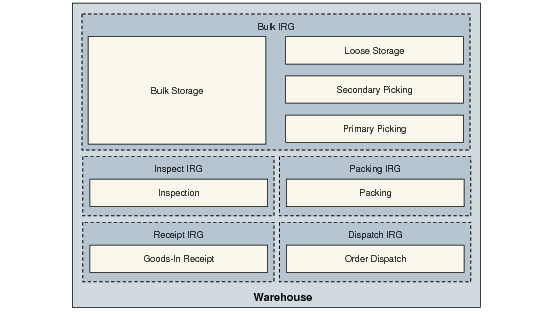
Storage Location Groups shows a simple arrangement of storage location groups within IRGs in a warehouse.
Storage Location Groups
Each IRG can contain one or more storage location groups.
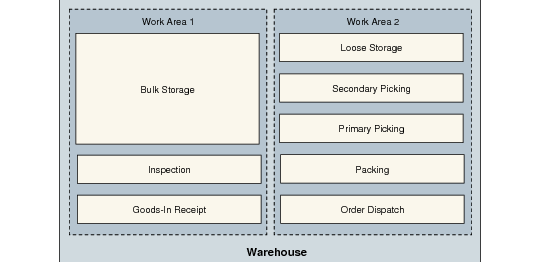
Work Location Groups shows the same locations, but now grouped into two work location groups.
Work Location Groups
Note: Work location groups do not have to contain entire SLGs; work Area 1 could include half of the Loose Storage area, with the other half being in Work Area 2. The arrangement of the work location groups is entirely independent of the arrangement of the storage location groups and internal routing groups.
The options you use for setting up and maintaining storage location groups and work location groups are both on the Location Menu (4.3).