QAD 2017 Enterprise Edition
>
User Guides
>
Warehousing
>
Defining Locations
>
Mass Location Maintenance
Mass Location Maintenance
When you have a large number of similar locations to define in a warehouse, you can simplify and speed up the setup procedure by using Mass Location Maintenance. There are two steps involved:
1 Use Sequence Definition Maintenance (4.23.1) to set up a sequence definition code. This identifies the template to use for setting up the individual locations. Then define the format and range of the location names that are generated. You can specify fixed-value parts and incrementing parts of the location names, so that you end up with location names such as Bulk0101, Bulk0102, Bulk0103, and so on.
2 Use Mass Location Maintenance (4.3.21) to generate the range of locations. You specify the location sequence definition you specified in Sequence Definition Maintenance, and the system uses the format and range you defined in step 1.
The final stage of creating a range of locations is to run Mass Location Maintenance to generate the location records based on one of the sequence definitions you have set up using the Sequence Definition Maintenance.
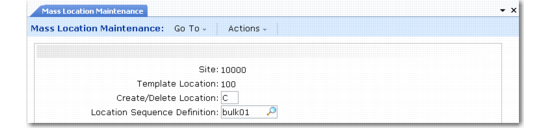
Mass Location Maintenance (4.3.21) is shown in
Mass Location Maintenance (4.3.21).
Mass Location Maintenance (4.3.21)
Enter values in the following fields:
Site
Enter the name of an existing site.
Template Location
As well as specifying a sequence definition code to define the way the location identifiers are generated, you must also specify a template location, which is used to provide the field settings for all the new locations you generate. It is useful, therefore, to create the first location in the sequence using Location Maintenance, set up the location field settings the way you want them for the entire group of locations, and then specify this location as the Template Location for Mass Location Maintenance.
Create/Delete Location
If you are running Mass Location Maintenance to create a block of locations, enter C in this field. The sequence definition code specifies the range of locations that are created.
You can also use Mass Location Maintenance to delete a block of locations; for example, if you are restructuring your warehouse with a different location layout. You do this by entering D in the Create/Delete Location field. Again, the sequence definition code specifies the range of locations that are deleted.
Location Sequence Definition
Specify the sequence definition code you want to use to create or delete a block of locations.
When you click Next to accept these entries, frame display the field settings for the template location so that you can modify them if required. When you have checked all the fields, you are prompted to continue. Enter Yes to continue with the process or No to quit.
At the bottom of the frame, the system displays another message to inform you of the number of locations that are created or deleted based on the sequence definition you have selected.
Note: If you are using the optional Supplier Consignment Inventory module, a Transfer Ownership field also displays. For more information on Supplier Consignment Inventory, see
QAD Purchasing User Guide.