QAD 2017 Enterprise Edition
>
User Guides
>
Warehousing
>
Defining Items
>
Defining Customer Status for Items
Defining Customer Status for Items
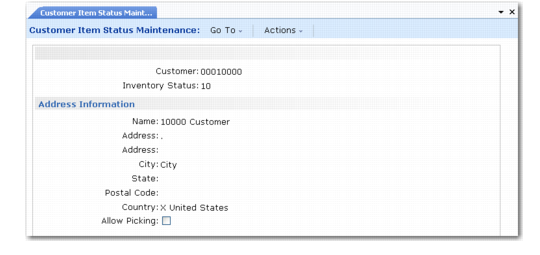
Customer Item Status Maintenance (4.4.17) lets you specify a particular inventory status code for a specified customer; see
Customer Item Status Maint (4.4.17). When the system is picking inventory to fill an order for that customer, it picks only inventory with that status. You can use this function, for example, to pick only Grade 1 status inventory for a particularly valued customer.
Customer Item Status Maint (4.4.17)
Enter values in the following fields:
Customer
Enter a valid code for the customer.
Inventory Status
Enter the item status code you want to specify for this customer.
The name and address details are taken from the customer address record created in Customer Create; you cannot modify them on this frame.