QAD 2017 Enterprise Edition
>
User Guides
>
Warehousing
>
Algorithms
>
Algorithm Assignment
Algorithm Assignment
Use Algorithm Assignment Maintenance (4.6.9) to link a specified sequence of algorithms—of one type per sequence—to a defined combination of the following:
• Transaction type
• Site
• Warehouse
• Item number or warehouse item type
• Address (supplier for received inventory, customer for shipped inventory)
Setting up as many combinations of these elements as you choose provides flexibility in the way you define the algorithms that are run in any given situation.
The reason for setting up a sequence of algorithms is so that you can specify the ideal method for selecting locations as the first step in the sequence. If the system cannot meet the full requirements either of put-away or picking by running the first choice algorithm, it then runs the second algorithm in the sequence, and so on until the requirement has been met.
Include a very general algorithm as the last one in the sequence, so that the task can always be completed.
Example: A general put-away algorithm merely asks the system to look for any storage location that has available capacity. While this does not meet any specific requirements, including it as a last step in the sequence means that the system can always put inventory away somewhere, preventing the task from failing.
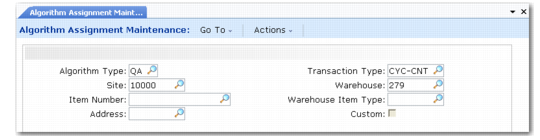
Algorithm Assignment Maintenance is shown in
Algorithm Assignment Maintenance (4.6.9).
Algorithm Assignment Maintenance (4.6.9)
Enter values in the following fields:
Algorithm Type
Enter the two-character code for the type of algorithm you want to assign. The standard codes are LF, PA, PK, SC and QA.
Transaction Type
Enter the transaction type to which you want to assign algorithms. You can use an asterisk as a wild card if you want to assign the same algorithm to a range of transaction types.
Example: The transaction type RCT-* covers all receipt transaction types, such as RCT-PO, RCT-UNP, RCT-WO, and so on.
Site
If this algorithm assignment is valid only for one site, enter the site name.
Warehouse
If this algorithm assignment is valid only for one warehouse, enter the warehouse name.
Item Number
If this algorithm assignment is valid only for one item, enter the item number. If you limit the assignment to an item number, you cannot also specify a warehouse item type; you can enter one or the other, but not both.
Warehouse Item Type
If you want to assign a sequence of algorithms to a combination of transaction type and warehouse item type, enter the item type code here. If you leave this field blank, the assignment will be valid for all item types.
The warehouse item type codes are a way of grouping together items that have similar properties. You assign the codes to items using the any of the warehouse item Maintenance functions.
If you enter a warehouse item type code, you cannot also enter an item number.
Address
If this algorithm assignment is valid only for one supplier or customer address, enter the address code.
Custom
If you want to assign a custom program instead of a sequence of algorithms, enter Yes in the Custom field; otherwise, enter No.
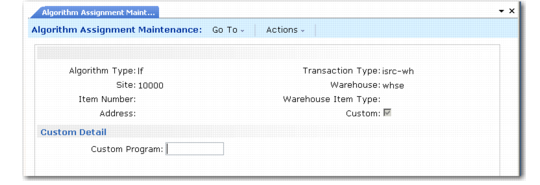
If you enter Yes in the Custom field, the system displays the Custom Detail frame shown in
Algorithm Assignment Maintenance, Custom Detail.
Algorithm Assignment Maintenance, Custom Detail
Custom Program.
Enter the name of the custom program to be run in place of any assigned algorithms. The custom program must exist before you can use this assignment.
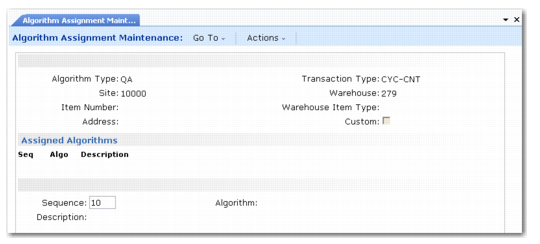
If you enter No in the Custom field, the system displays the frame shown in
Algorithm Assignment Maintenance, Assignment Fields.
Algorithm Assignment Maintenance, Assignment Fields
Enter values in the following fields:
Sequence
For a new assignment, Sequence defaults to 10. Number sequences by 10’s (10, 20, 30, and so on) so that additional steps can be inserted easily later, if required.
Algorithm
Assign algorithms of the type you selected at the top of the frame.
Example: If you selected algorithm type PA, you can assign any of the put-away algorithms. You can either type in the required number, or use the Up and Down arrow keys to move through the list of algorithms.
Use Algorithm Master Maintenance (4.6.5) to modify the description of the algorithm you select.
Description
The system displays the description of each algorithm as its number is shown in the Algorithm field. You cannot modify the descriptions here.
Remember, the system tries to use the first algorithm in the sequence first, typically sequence 10. If that fails to complete the transaction, it moves on to the second algorithm (20). You should, therefore, put your ideal solution first, and finish the sequence with a fail-safe option designed to prevent complete failure of the transaction.
As you enter the required algorithms in the assignment sequence, the system adds them to the list in the center of the frame.