QAD 2017 Enterprise Edition
>
User Guides
>
Warehousing
>
Algorithms
>
Simulation
>
Put Away/Location Find Simulation
Put Away/Location Find Simulation
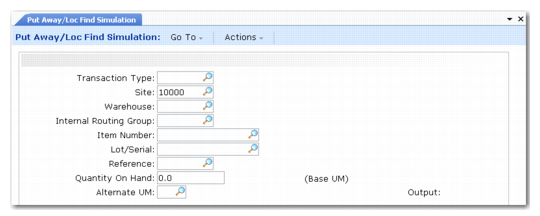
Put Away/Location Find Simulation (4.6.13) is shown in
Put Away/ Location Find Simulation (4.6.13).
Put Away/
Location Find Simulation (4.6.13)
Enter values in the following fields:
Transaction Type
Enter the transaction type that you want to simulate. This must be a transaction type to which you have assigned PA or LF algorithms.
Site
Enter the site name.
Warehouse
Enter the warehouse name.
Internal Routing Group
Enter the name of the IRG into which the simulated inventory is to be received. If this is a functional IRG, the LF algorithm assigned to this transaction type is used for the simulation. If this is a non-functional IRG, the PA algorithm is used.
Item Number
Enter the item number of the simulated inventory to be received.
Lot/Serial
Enter the lot/serial number for the inventory, if applicable.
Ref
Enter the reference number for the inventory, if applicable.
Quantity On Hand
Enter the quantity of the received inventory, in base UM.
Alternate UM
Enter the alternate unit of measure in which the inventory is to be received. Note that the quantity you entered in the previous field is the number of items in base UM, and not the number of, for example, pallets, if this is the alternate UM.
When you click Next to accept the simulation entries, the system runs the relevant algorithms and displays the results of the put-way or location-find.