QAD 2017 Enterprise Edition
>
User Guides
>
Warehousing
>
Engine Processing
>
Creating Transaction Types
Creating Transaction Types
Each type of inventory transaction is identified by a transaction type code. Examples are a purchase order receipt (RCT-PO) or a sales order pick (PICK-SO). All standard transaction types are already set up within the system.
You can add extra transaction type codes to define special types of inventory transactions that are not covered by the standard types. You can also modify the field settings for the standard transaction type codes so that the system processes the transactions in the way you require.
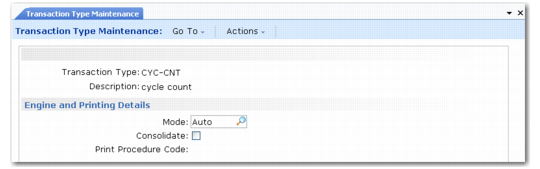
Transaction Type Maintenance (4.7.1) is shown in
Transaction Type Maintenance (4.7.1).
Transaction Type Maintenance (4.7.1)
Enter values in the following fields:
Type
Enter the code for the transaction type.
Description
Enter the description of the transaction type.
Mode
Specify how processes involving this transaction type are initiated. The options are as follows:
AUTO | The next process in the routing sequence is started automatically as soon as the previous process is complete. |
MANUAL | The next process is only started when it is manually selected for processing with an engine workfile. |
Consolidate
This option applies only to MANUAL mode. Enter Yes to allow the system to consolidate similar records that are waiting to be processed.
Example: If one manual record awaiting processing is to put away 100 of item A and a second record is to put away 50 of item A, consolidation lets the system process one record to put away 150 instead of the two separate records.
Enter No if you do not want to consolidate records, or if the mode is AUTO.
Print Procedure Code
Enter a code to define the printing procedures to be carried out for this transaction type. Set up codes in Generalized Code Maintenance (36.2.13). The basic codes are AJ (adjustment), IN (inspection), PK (picking), RC (receipt), SH (shortage), and TF (transfer). See
Print Procedure Codes.
Together with the print flavor code defined at the work location group level, the print procedure code specifies the name of the program to start to print a transaction task or a pallet ID.
Example: The print ID program, used when making a receipt, is called whprirca.p:
(wh + pr (print) + i (ID) + RC (Print Procedure Code for a Receipt) + A (Print Flavor))
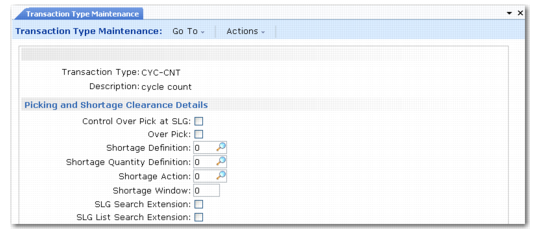
Transaction Type Maintenance, Picking and Storage Clearance Details
The fields in this frame apply only to transaction types that involve picking. You must enter shortage definition settings for these so that the system can deal with shortages correctly, but you can ignore them for other transaction types.
Control Over Pick at SLG
Enter Yes if over picking is to be controlled by the setting of the field at the SLG level, or No if it is to be controlled from the setting of the field for the transaction type.
Over Pick
Indicate whether transactions of this type can pick more stock from locations than is specified in the order. Enter Yes if overpicking is allowed; otherwise, enter No.
This field works in conjunction with the Allow Split field—specified at the storage location group level—to control whether stock can be picked from locations in the SLG in situations where the quantity required for the pick does not match the unit of measure in which the item is stocked in the location.
Example: If a location contains boxes of 100 of the item and the required picking quantity is 70 pieces, the following possibilities can be specified:
Over Pick | Allow Split | Result |
Yes | Yes | Pick 70 by splitting a box |
Yes | No | Over pick—take a box of 100 |
No | Yes | Pick 70 by splitting a box |
No | No | No pick from this location |
Shortage Definition
For picking transaction types, enter a code from 0 to 10 to specify what constitutes a shortage. The options are as follows:
Code | Definition |
0 | A field is available on each order detail record that can be manually set to Yes to indicate a shortage. |
1 | A field is available on each order detail record that is automatically set to Yes when picking is attempted. This constitutes a shortage. |
2 | General allocation: an allocated quantity greater than zero that is not detail allocated indicates a shortage. |
3 | Open order quantity: an order quantity greater than the sum of the allocated quantity, picked quantity, and shipped quantity indicates a shortage. |
4 | Non-detail allocated quantity: an order quantity greater than the sum of any detail allocations and the picked quantity and shipped quantity indicates a shortage. |
5 | General allocation previously picked: as 2 except that the sum of the quantity picked and quantity shipped must be greater than zero. |
6 | Open order quantity previously picked: as 3 except that the sum of the quantity picked and quantity shipped must be greater than zero. |
7 | Non-detail allocated quantity previously picked: as 4 except that the sum of the quantity picked and quantity shipped must be greater than zero. |
8 | General allocation, other line previously picked: as 2 except that sum of the quantity picked and quantity shipped of a different line on the same order must be greater than zero. |
9 | Open order quantity, other line previously picked: as 3 except that sum of the quantity picked and quantity shipped of a different line on the same order must be greater than zero. |
10 | Non-detail allocated, other line previously picked: as 4 except that sum of the quantity picked and quantity shipped of a different line on the same order must be greater than zero. |
Shortage Quantity Definition
For picking transaction types, enter a code from 0 to 2 to specify how the shortage quantity is calculated. The options are as follows:
Code | Definition |
0 | General allocated quantity |
1 | Open order quantity (ordered, less allocated, less picked, less shipped) |
2 | Non-detail allocated quantity (ordered, less total detail allocations, less picked, less shipped) |
Shortage Action
For picking transaction types, enter a code from 0 to 3 to specify the action that the system should take when a shortage is detected. The options are as follows:
Code | Definition |
0 | No action: Warehouse transactions are created. |
1 | Order line is general allocated; warehouse transactions are created. |
2 | Order line is detail allocated. These allocations are converted to detail picks that create warehouse transactions. |
3 | Order Line is detail allocated—not detail picked, and warehouse transactions are created. |
Shortage Window
Enter a number indicating the number of days before an order line due date that it can be considered short.
Example: 1 indicates that an order line due tomorrow is short, but that one due the day after—2 days away—is not.
SLG Search Extension
When doing a transfer with a user-provided destination location, if the destination is full, the put-away takes place in the storage location group of the destination location given by the user.
SLG List Search Extension
When doing a transfer with a user-provided destination location, if the destination is full, the put-away takes place in the storage location groups linked to the list of SLGs defined at item/warehouse level of the destination location given by the user.
Note: You can either first check in the SLG of the current destination location and then in the complete list of SLGs or only look at the current SLG for the given location. If you set the SLG List Search Extension field to Yes you must set the SLG Search Extension field to Yes also.