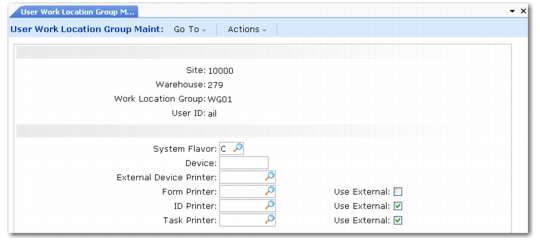
User Work Location Group Maintenance
Use User Work Location Group Maint to assign a user to a work location group and set up print options specific to that user.
User Work Location Group Maintenance (4.11.3.13)
Site
Enter a site for the user and work location group.
Warehouse
Enter a warehouse for the user and work location group.
Work Loc Group
Enter the work location group to link to the user.
User ID
Enter the ID of the user to link to the work location group.
System Flavor
Enter the code to define the style and format of Radio Frequency (RF) screens that display warehouse information.
Device
Enter the code for the device to be used, such as an RF or Radio Data Terminal (RDT), within this work location group.
External Device Printer
Enter the code for the device printer.
Form Printer
Enter the code for the form printer.
ID Printer
Enter the code for the ID printer.
Task Printer
Enter the code for the task printer, or select a code from the drop-down list.
Use External
Indicate whether tasks/forms/IDs should be printed on an external printer.