QAD 2017 Enterprise Edition
>
User Guides
>
Warehousing
>
Labor Management
>
Updating Task Priorities
Updating Task Priorities
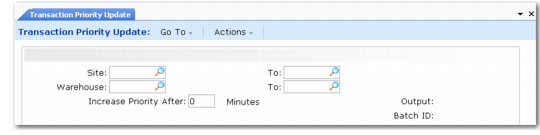
Use Transaction Priority Update (4.11.5) to change and report the priority of tasks. You can enter a range of sites or warehouses; then enter a period in minutes that determines how old tasks must be before the system increases their priority. After taking the delay period you specify into account, the frequency at which the system changes task priority is defined by the frequency at which you run a batch picking program. When you run batch picking, the system increments the task priority when it creates the tasks.
The system bases the task priority first on the setting of the Priority field in Internal Routing Maintenance (4.2.5). If it is not set there, it uses the priority that you set for transactions in the Priority field in Work Location Group Maintenance (4.3.9).
If you specify changes to priority in Task/Priority Update Report/Batch, the system ignores any changes to priority that you make in either Internal Routing Maintenance or Work Location Group Maintenance. However, you can change both values manually by setting the Priority field in Transaction Maintenance (4.8.13).
Transaction Priority Update (4.11.5)