Sequence Definition Maintenance
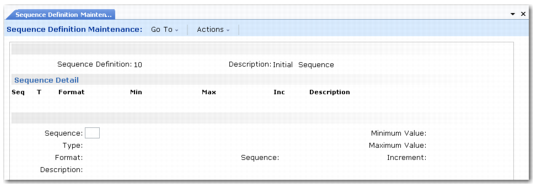
Sequence Definition Maintenance (4.23.1) illustrates Sequence Definition Maintenance (4.23.1).
Sequence Definition Maintenance (4.23.1)
Sequence Definition
Enter a code to identify this sequence definition, which can be a pallet numbering scheme or a template for creating a particular set of locations.
Description
Enter a description to explain how this sequence definition is used.
You can enter a number of sequence definitions in succession using these two fields.
When you have set up your sequence definition codes, the next step is to define the details of the way the system generates the next required pallet reference, or identify a whole sequence of locations; for example by including an incrementing number in one part of the location identifier.
Sequence Detail Frame
Sequence
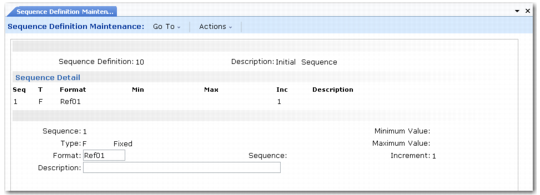
The pallet reference numbers or location identifiers for the range of locations are constructed from sequential segments, which can be fixed values or incrementing numbers; for example, Bulk01, Bulk02, where the Bulk segment is fixed and the number segment is incremented. Enter a sequence number like 1, 2, or 3 to specify which sequential segment of the identifier you are defining in the remaining fields of this program.
Type
Enter the type for this segment of the identifier. Valid types are:
• I for integer
• C for character
• F for fixed
• D for Date
• S for Sequence
Depending on the type you select, you enter additional details in other fields in the frame.
Example: If you enter S for sequence, you specify only which sequence you want in the DB Sequence field, and optionally, a description.
Format
Enter the format for this segment of the reference number or location identifier. Valid formats are:
Segment Type | Format Entry |
I | Enter an integer for each numeric position. |
C | Enter a character for each character position. |
F | Enter the actual text to use for the fixed value. |
D | Enter one of the following valid date formats: DD, MM, YY, or YYYY. Use consecutive segments if you want a full DDMMYY date. |
Note: The I (Integer) type and the S (Sequence) type are very different. The I type is used when you want to generate all values between boundaries. S is used when you want to have an increment that is not limited only by the maximum size of the sequence. For instance, for a pallet number generation, you want to generate a new number for each pallet. Use type S for the increment. When you want to use the sequence definition to generate locations within a range such as from Bulk10 to Bulk99, use an Integer sequence.
In the previous example (Bulk01, Bulk02, and so on), the first segment has type F, format Bulk; the second segment has type I, format 99.
DB Sequence
For sequence segments, enter the sequence you want to use. Each time a new pallet reference is required, the system takes the next sequential number from the specified sequence.
Minimum Value
For incrementing segments, enter the start value for the incrementing range. Leave this field blank for fixed segments.
Maximum Value
For incrementing segments, enter the end value for the incrementing range. Leave this field blank for fixed segments.
Increment
For incrementing segments, enter the amount by which each successive location identifier or reference number should be incremented.
Description
Enter a description of this segment of the reference number or location identifier, if required. This is used for information purposes only.