Verbosity
Warehouse reporting can be verbose. You can control the level of verbosity in all QAD Warehousing reports by setting a Verbosity Level field in Warehouse Management Control (4.24). Other reports and functions may include a Verbosity Level field where you can override the system setting.
When you set a value other than zero for the Verbosity Level in Warehouse Management Control, the system creates verbose messages that indicate different processes the system is following. You can see those messages using either Verbosity Injury (4.23.12.1) and Verbosity Report (4.23.12.3).
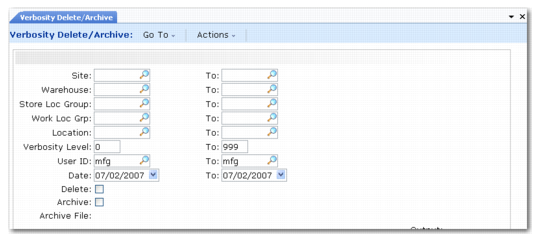
The system uses the VerbH table to hold messages. The table can grow quite large over time. Use Verbosity Delete/Archive (4.23.12.23) to delete old messages; see
Verbosity Delete/Archive (4.23.12.23).
You can delete/archive by specifying a range of sites, warehouses, storage location groups, locations, verbosity levels, and user IDs.
Verbosity Delete/Archive (4.23.12.23)