Specifying Barcode Prefixes
Use Barcode Prefix Maintenance (4.23.17) to define a one- to four-digit prefix for any or all of following fields:
• Date (expiration date)
• Item
• Location
• Lot/serial
• Quantity
• Reference
• Tote
Note: Tote is used in batch picking and consolidation.
• Carrier
• Pick-list
• Shipper
• Master Bill of Lading
• Order
• Address
Note: Address is used in receipts and shipments. Also, you set up the order and address prefixes as generalized codes for the ScanField field.
You can set up prefixes when using RF containerization or container move features. Because you cannot determine whether staff scan a tote they create in batch picking or scan a reference through full-pallet picking of wave replenishment, the prefixes are valid for both boxes/pallets that are either totes or references.
Similarly, when using the RF Print Paperwork function for scanning pick-lists (pre-shippers), shippers, or master bill of ladings, the system validates prefixes for all these document types.
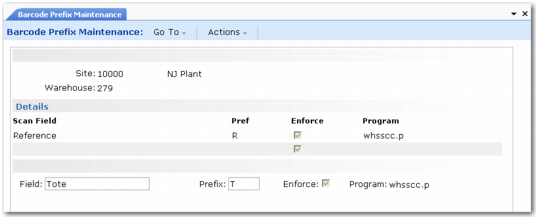
Barcode Prefix Maintenance (4.23.17)
Site
Enter the site for scanning prefixes.
Warehouse
Enter the warehouse for scanning prefixes.
Scan Field
Enter one of the following fields:
• Date
• Item
• Location
• Lotserial
• Quantity
• Reference
• Tote
• Carrier
• Picklist
• Shipper
• MBOL
• Order
• Address
Prefix
Enter up to a four-character prefix that represents the scan field definition. For example, enter L for location, R for reference, or D for date.
The system uses the expiration date for the date prefix. Only the RF PO Receipt (1.8) menu option prompts for the expiration date.
Enforce
Indicate whether to enforce prefix use during barcode scanning.
No: Staff can scan barcodes without prefixes.
Yes: Staff must scan a barcode with a prefix, unless the environment variable AIMSkipPrefix is set to Yes for that user (see the following section on disabling prefixes).
Program
Enter a program to read and interpret barcodes:
whsscc.p: for SSCC barcodes
whean128: for UCC/EAN-128 barcodes
Warehouse users can scan either EAN or SSCC codes and have values displayed for the various prefixes in the RF.
Example: You specify the whean128.p program for use with the Q(uantity) prefix. The RF prompts the user for the quantity. The user enters the EAN-128 code 30100. The whean128.p program reads the 30100 code and identifies the EAN prefix 30 for the quantity. It removes the prefix 30 and returns the value of 100 as the valid quantity.