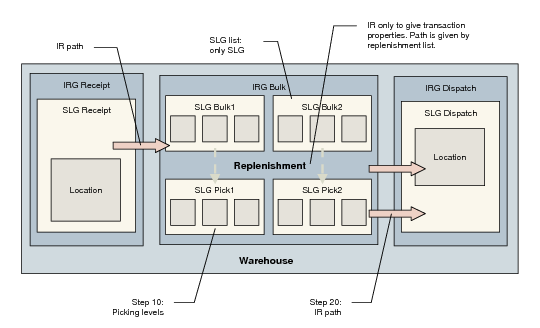
Internal Routings and Transaction Properties
When you define an internal routing, you:
• Define the movement of inventory between internal routing groups; for example, from IRG receipt to IRG bulk.
• Set the properties for the transactions that use this internal routing—creating the transaction, confirming the transaction, and printing the transaction/confirmation.
You only need to define a sequence of movements if the transaction involves moving inventory between IRGs, such as receipts or issues. If the inventory is being moved within an IRG such as a replenishment, you set up the internal routing only in order to define the transaction properties. The path for the inventory comes from the replenishment list and the known location/SLG.
When you define an IR for a movement between IRGs, the transaction properties do not come from step 10, but from step 20.
Internal Routings and Transactions summarizes the relation between internal routings and transaction properties.
Internal Routings and Transactions